In LDM Tutorial, We registerd a bus, a device, and a driver,
The kernel bound them together and probe() fired automaticaly. But at that point, user-space
had no way to interact with the driver beyond it existed in sysfs.
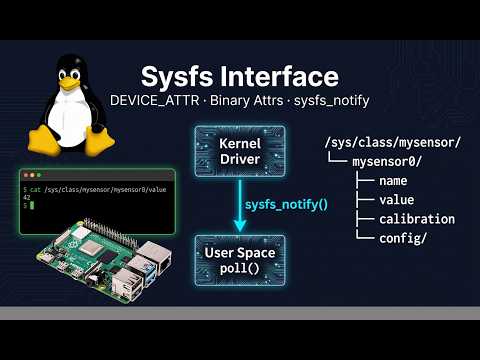
This tutorial changes that. Sysfs attributes are how driver exposes its internal state to user-space -> As simple files under /sys/.
Reading a file calls show() function. Writing a file calls the store() function. NO IOCTL, no custom character device protocol, just files nodes.
This tutorial covers three things:
- Device attributes :- What they are and how the
DEVIEC_ATTRmacro works - Creating and removing sysfs files :- the lifecycle of sysfs attribute file
- Class interface :- exposing attributes under
/sys/class/mydriverand triggering automatic/devnode creation.
A device attribute is a file in sysfs that represents one property of a device.
The kernel provides the DEVICE_ATTR macro to define them cleanly.
DEVICE_ATTR(_name, _mode, _show, _store)This macro defines a variable called dev_attr_name (note the prefix). The four arguments are:
_name |
The filename that will appear in sysfs |
_mode |
File permissions : 0444 read-only, 0644 read-write, 0200 write-only |
_show |
Called when user space reads the file (cat) |
_store |
Called when user space writes the file (echo), pass NULL for read-only |
/* Read-only attribute called "name" */
struct device_attribute dev_attr_name = { .attr = { .name = "name", .mode = 0444 }, .show = name_show, };
/* or */
DEVICE_ATTR(name, 0444, my_show_name, NULL);

/* Read-write attribute called "value" */
struct device_attribute dev_attr_name = { .attr = { .name = "value", .mode = 0644 }, .show = my_show_value, .store = my_store_value, };
/* or */
DEVICE_ATTR(value, 0644, my_show_value, my_store_value);show() is called when user space reads the attribute file. It receives a pointer to the device, the attribute, and a page-sized buffer to write into.
static ssize_t my_show_name(struct device *dev,
                             struct device_attribute *attr,
                             char *buf)
{
    /* get our private data back from the embedded struct device */
    struct my_device *mydev = container_of(dev, struct my_device, dev); // or dev_get_drvdata if device stored as a pointer, inside a structure field.

    return snprintf(buf, PAGE_SIZE, "%s\n", mydev->name);
}
Things to note:
-
container_of()is how we get back to our own struct from the genericstruct device *the kernel hands. This is the same pattern from last LDM example. -
Always end the string with
\n. Tools likecatexpect it, and without it the output runs into the next shell prompt. -
Return the number of bytes written.
snprintfdoes it.
store() is called when user-space writes to the attribute file. It receives the buffer and the count of bytes written.
static ssize_t my_store_value(struct device *dev,
                               struct device_attribute *attr,
                               const char *buf, size_t count)
{
    struct my_device *mydev = container_of(dev, struct my_device, dev); // or dev_get_drvdata if device stored as a pointer, inside a structure field.
    int val;
    int ret;

    ret = kstrtoint(buf, 10, &val);  /* parse integer from string */
    if (ret < 0)
        return ret;

    mydev->value = val;

    return count;  /* always return count on success */
}
Key rules for store():
- Use
kstrtoint(),kstrtoul(), orkstrtobool()to parse input, neversscanf()directly on user-data. - Always return
counton success, not 0. If you return 0, the kernel thinks nothing was written and will callstore()again in a loop. - Validate the input before applying it. Return a negative errno if the value is out of range.
Defining the attribute with DEVICE_ATTR does not create the file. we have to explicitly create and remove it around the device's lifetime.
Call device_create_file() after device_register() : the device must exist in sysfs before add files to it.
static int my_probe(struct device *dev)
{
    int ret;

    /* --- initialize hardware --- */

    /* create the sysfs attribute file */
    ret = device_create_file(dev, &dev_attr_name);
    if (ret) {
        dev_err(dev, "failed to create sysfs attribute: %d\n", ret);
        return ret;
    }

    return 0;
}
After this, /sys/devices/mybus0/mydev0/name exists and is readable from user space.
Call device_remove_file() before device_unregister().
If we remove the device before removing its attribute files, we get a kernel warning about dangling sysfs entries.
static int my_remove(struct device *dev)
{
    device_remove_file(dev, &dev_attr_name);  /* remove first */
    /* device_unregister() follows after this returns */
    return 0;
}
The rule is simple:
- create after register
- remove before unregister.
- Always reverse order on cleanup.
For more than one attribute, use device_create_file() for each one.
If any call fails, undo the ones that already succeeded before returning the error.
static int my_probe(struct device *dev)
{
    int ret;

    ret = device_create_file(dev, &dev_attr_name);
    if (ret) return ret;

    ret = device_create_file(dev, &dev_attr_value);
    if (ret) {
        device_remove_file(dev, &dev_attr_name);  /* undo */
        return ret;
    }

    return 0;
}

static int my_remove(struct device *dev)
{
    device_remove_file(dev, &dev_attr_value);  /* reverse order */
    device_remove_file(dev, &dev_attr_name);
    return 0;
}
Alternatively, use sysfs_create_group() with an attribute_group struct to create and destroy all attributes at once.
static struct attribute *my_attrs[] = {
    &dev_attr_name.attr,
    &dev_attr_value.attr,
    NULL,  /* sentinel */
};

static struct attribute_group my_attr_group = {
    .attrs = my_attrs,
};

/* In probe: */
ret = sysfs_create_group(&dev.kobj, &my_attr_group);

/* In remove: */
sysfs_remove_group(&dev.kobj, &my_attr_group);Device attributes under /sys/devices/ are useful for device-specific data. But for a cleaner user-facing interface and for automatic /dev node creation, we use the class interface.
A class groups devices by function. The class interface exposes a directory under /sys/class/mydriver/ that user space and udev can reliably find regardless of which bus the device is on.
static struct class *my_class;

static int __init mydriver_init(void)
{
    my_class = class_create(THIS_MODULE, "mydriver");
    if (IS_ERR(my_class))
        return PTR_ERR(my_class);

    /* ---- register bus, driver, etc. ---- */
    return 0;
}

static void __exit mydriver_exit(void)
{
    /* ---- unregister driver, bus, etc. ---- */
    class_destroy(my_class);
}
After class_create(), /sys/class/mydriver/ appears in sysfs.
Call device_create() inside probe() after the hardware is ready. This is what triggers udev to create the /dev node automatically.
static dev_t my_devno;
static struct device *my_class_dev;

static int my_probe(struct device *dev)
{
    int ret;

    /* allocate a char device number */
    ret = alloc_chrdev_region(&my_devno, 0, 1, "mydev");
    if (ret)
        return ret;

    /*
     * device_create() does three things:
     *   1. Creates /sys/class/mydriver/mydev0/ directory
     *   2. Writes major:minor into /sys/class/mydriver/mydev0/dev
     *   3. Fires a uevent - udevd reads 'dev' and creates /dev/mydev0
     */
    my_class_dev = device_create(my_class, dev, my_devno, NULL, "mydev0");
    if (IS_ERR(my_class_dev)) {
        ret = PTR_ERR(my_class_dev);
        goto err_chrdev;
    }

    /* now add attribute files under the class device */
    ret = device_create_file(my_class_dev, &dev_attr_name);
    if (ret)
        goto err_device;

    return 0;

err_device:
    device_destroy(my_class, my_devno);
err_chrdev:
    unregister_chrdev_region(my_devno, 1);
    return ret;
}

static int my_remove(struct device *dev)
{
    device_remove_file(my_class_dev, &dev_attr_name);  /* attributes first */
    device_destroy(my_class, my_devno);                 /* then the device */
    unregister_chrdev_region(my_devno, 1);
    return 0;
}
The resulting sysfs tree
/sys/class/mydriver/
└── mydev0/
    ├── dev          ← "major:minor" udev reads this to call mknod
    ├── name         ← device_create_file() attribute - cat/echo
    └── uevent       ← uevent attributes

/dev/mydev0          ← created automatically by udev - no manual mknod
Attributes added with device_create_file() on the class device appear under /sys/class/mydriver/mydev0/ - not under /sys/devices/. This is the path user-space tools typically look at.
/* show: called when user reads /sys/class/mydriver/mydev0/name */
static ssize_t my_show_name(struct device *dev,
                             struct device_attribute *attr, char *buf)
{
    return snprintf(buf, PAGE_SIZE, "mydev0\n");
}

/* store: called when user writes /sys/class/mydriver/mydev0/name */
static ssize_t my_store_name(struct device *dev,
                              struct device_attribute *attr,
                              const char *buf, size_t count)
{
    dev_info(dev, "user wrote: %s\n", buf);
    return count;
}

DEVICE_ATTR(name, 0644, my_show_name, my_store_name);Once the attribute files exist, interacting with them from user space is just standard file I/O.
# Read an attribute (calls show())
cat /sys/class/mydriver/mydev0/name

# Write an attribute (calls store())
echo "12" > /sys/class/mydriver/mydev0/value

# Read the dev attribute to see major:minor
cat /sys/class/mydriver/mydev0/dev

# Verify the /dev node was created by udev
ls -l /dev/mydev0

# Watch the uevent that fired when device_create() was called
udevadm info --query=all --name=/dev/mydev0module_init()
│
├── class_create() ──────────────── /sys/class/mydriver/
├── bus_register()
├── driver_register()
│ │
│ └── bus calls my_match() → probe()
│ │
│ ├── device_create() ── /sys/class/mydriver/mydev0/
│ │ urevent → udev → /dev/mydev0
│ └── device_create_file() ── .../mydev0/name
│ .../mydev0/value
│
↕ user space: cat / echo on sysfs files
│
module_exit()
│
├── device_remove_file() ← attributes first
├── device_destroy() ← then the class device
├── unregister_chrdev_region()
├── driver_unregister()
├── bus_unregister()
└── class_destroy() ← class last
Standard DEVICE_ATTR attributes are text-based, everything goes through
strings. Binary attributes skip that and let you read/write raw binary data
directly. Useful for things like firmware blobs or calibration data.
static struct bin_attribute my_bin_attr = {
    .attr  = { .name = "firmware", .mode = 0444 },
    .size  = MY_FW_SIZE,
    .read  = my_bin_read,
};
/* or */
static BIN_ATTR(firmware, 0444, my_bin_read, NULL, MY_FW_SIZE);

/* In probe: */
device_create_bin_file(dev, &my_bin_attr);

/* In remove: */
device_remove_bin_file(dev, &my_bin_attr);
The read and write callbacks receive a raw buffer and an offset - similar
to a file_operations read/write, but routed through sysfs.
Normally, user space has to keep reading a sysfs file to detect changes -
polling.
sysfs_notify() solves this.
When something changes inside our driver,
we can call sysfs_notify() and user space gets woken up through a
poll() or select() call on the sysfs file - no busy loop needed.
/* Inside the driver - e.g. from an IRQ handler or workqueue -
   when a value changes: */
sysfs_notify(&dev->kobj, NULL, "value");

/* User space polls the file and wakes up when notified:
   fd = open("/sys/class/mydriver/mydev0/value", O_RDONLY);
   poll(&fds, 1, -1);   <- blocks until sysfs_notify() is called
   read the new value    <- then reads the updated data             */
This is the clean pattern for things like hardware interrupts updating a sensor value - the driver notifies, user-space reacts, no polling required.
References
- linux-kernel-labs: Linux Device Model
- Linux Kernel Documentation: Driver Model sysfs
- Kernel source: include/linux/device.h
- Linux Device Drivers, 3rd Edition: Chapter 14: The Linux Device Model