


Languages | 中文 | Français | Deutsch | Italiano | Español
An intelligent GBA Pokémon ROM translator powered by LLM with both GUI and CLI interfaces
Meowth GBA Translator is a comprehensive tool designed for translating Pokémon Game Boy Advance (GBA) ROMs. It combines automated text extraction, AI-powered intelligent translation, and ROM building functionality to greatly simplify the translation workflow.
- Dual Interface Support: User-friendly GUI and powerful CLI
- AI Translation: Support for 11+ LLM providers (OpenAI, DeepSeek, Google Gemini, etc.)
- Cross-Platform: Support for macOS, Windows, Linux
- Six Language Support: English, Spanish, French, German, Italian, Chinese
- Efficient Workflow: Extract → Translate → Build in one command
- Completely Free: 100% open source, MIT license
- Smart Font Library: Automatic font injection for Chinese translations
Download the latest version:
- macOS: Meowth-Translator-macOS.dmg
- Windows: Meowth-Translator-Windows.zip
System Requirements:
- macOS 10.13+ or Windows 10+
- No installation needed, run directly after download
# Install CLI only
pip install meowth

# Or install with GUI support
pip install meowth[gui]
System Requirements:
- Python 3.10 or higher
- pip package manager
# Clone repository
git clone https://github.com/Olcmyk/Meowth-GBA-Translator.git
cd Meowth-GBA-Translator

# Create virtual environment
python3 -m venv venv
source venv/bin/activate  # Windows: venv\Scripts\activate

# Install in development mode
pip install -e ".[gui,dev]"

# Run GUI
meowth-gui

# Or use CLI
meowth full pokemon.gba --provider deepseek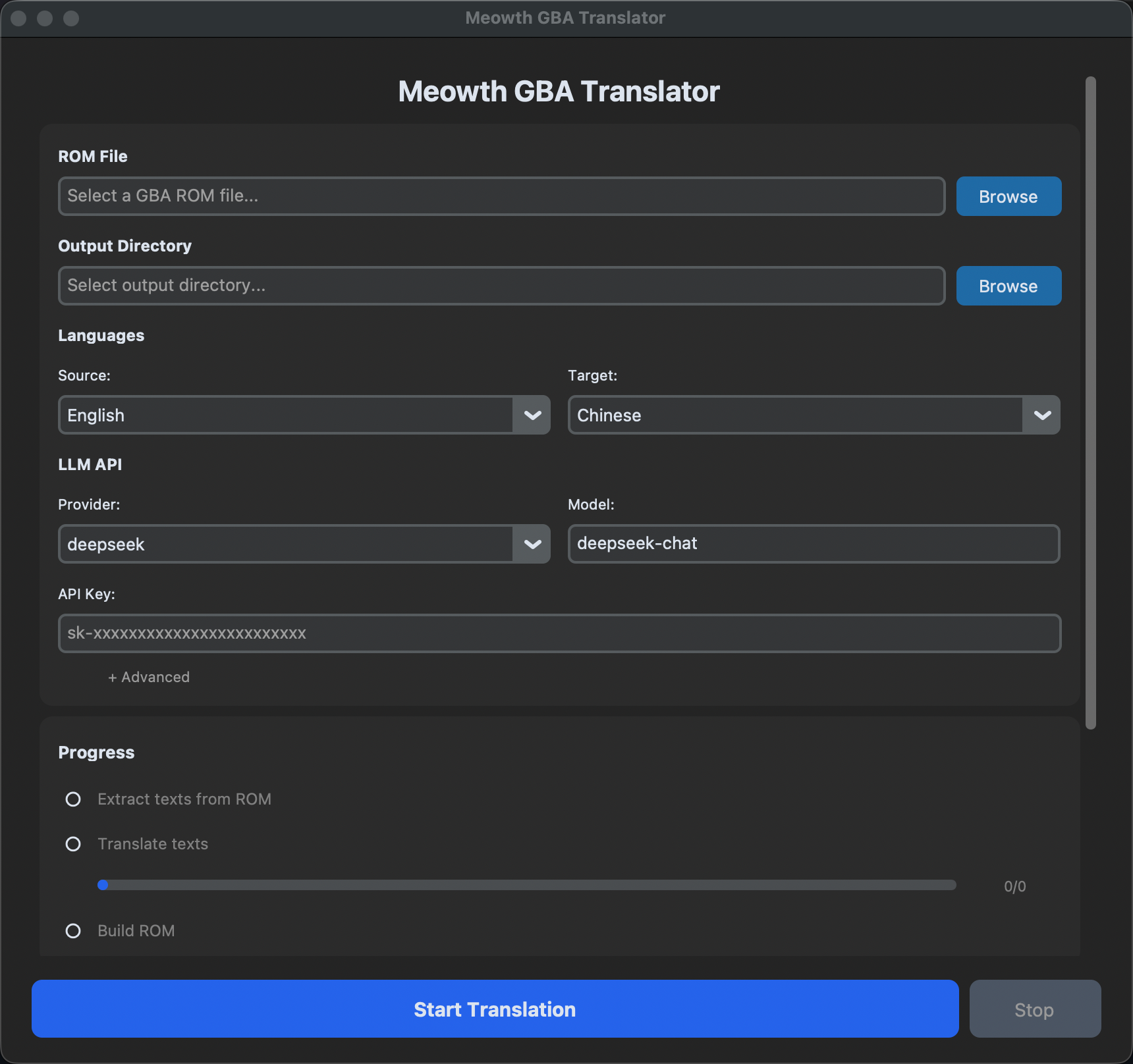
- Download and run Meowth Translator
- Click "Select ROM" and choose your GBA Pokémon ROM
- Configure translation settings:
- LLM Provider: Select LLM provider (OpenAI, DeepSeek, etc.)
- Source Language: Usually "English"
- Target Language: Your desired language
- Click "Start Translation"
- Wait for completion (typically 5-30 minutes depending on ROM size)
- Download the translated ROM from the output folder
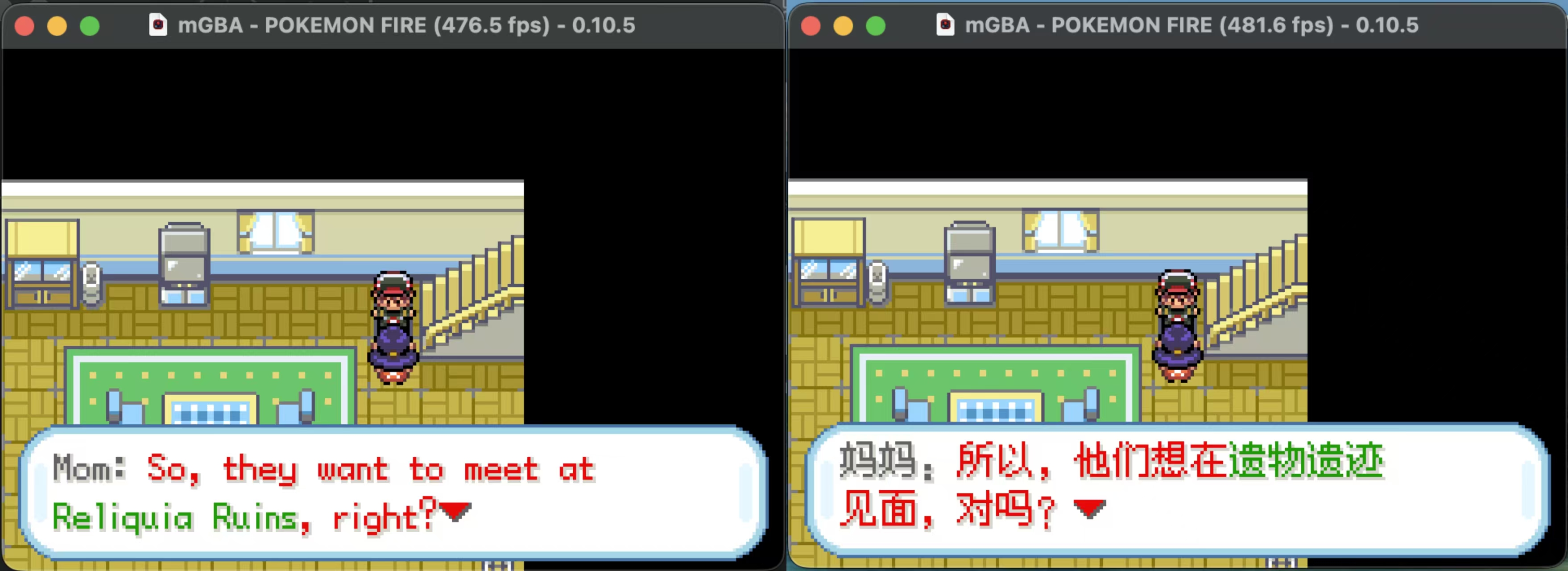 Left: Original game | Right: Translated game
First, set your API key as an environment variable:
# DeepSeek (Recommended)
export DEEPSEEK_API_KEY="sk-your-key"

# Or other providers
export OPENAI_API_KEY="sk-your-key"
export GOOGLE_API_KEY="your-key"# Run complete translation pipeline
meowth full pokemon_firered.gba \
--provider deepseek \
--source en \
--target en \
--output-dir translated_roms
# Translated ROM will be saved to: translated_roms/pokemon_firered_en.gba| Provider | Default Model | API Key |
|---|---|---|
| DeepSeek | deepseek-chat | DEEPSEEK_API_KEY |
| OpenAI | gpt-4o | OPENAI_API_KEY |
| Google Gemini | gemini-2.0-flash | GOOGLE_API_KEY |
| Claude (Anthropic) | claude-sonnet-4 | ANTHROPIC_API_KEY |
| Groq | llama-3.3-70b | GROQ_API_KEY |
| Mistral | mistral-large-latest | MISTRAL_API_KEY |
| OpenRouter | openai/gpt-4o | OPENROUTER_API_KEY |
| SiliconFlow | DeepSeek-V3 | SILICONFLOW_API_KEY |
| Zhipu GLM | glm-4-flash | ZHIPU_API_KEY |
| Moonshot | moonshot-v1-8k | MOONSHOT_API_KEY |
| Qwen | qwen-plus | DASHSCOPE_API_KEY |
Recommendation: We recommend using DeepSeek as it was used throughout development and testing. Translating a typical GBA Pokémon ROM costs approximately 2 RMB (~$0.28 USD) with DeepSeek.
Complete extraction, translation, and building in one command:
meowth full pokemon.gba \
  --provider deepseek \
  --source en \
  --target en \
  --output-dir outputs
Options Explanation:
--provider: LLM provider to use--source: Source language code (default: "en")--target: Target language code (default: "en")--output-dir: Output folder (default: "outputs")--work-dir: Temporary working folder (default: "work")--batch-size: Texts per translation batch (default: 30)--workers: Parallel translation threads (default: 10)--api-base: Custom API address (for OpenAI-compatible APIs)--api-key-env: Environment variable name for API key--model: Custom model name
For advanced users who need more control:
# Step 1: Extract text from ROM
meowth extract pokemon.gba -o texts.json

# Step 2: Translate text
export DEEPSEEK_API_KEY="sk-your-key"
meowth translate texts.json \
  --provider deepseek \
  --target en \
  -o texts_translated.json

# Step 3: Build translated ROM
meowth build pokemon.gba \
  --translations texts_translated.json \
-o pokemon_en.gbaCreate meowth.toml in your working directory:
[translation]
provider = "deepseek"
model = "deepseek-chat"
source_language = "en"
target_language = "en"

[translation.api]
key_env = "DEEPSEEK_API_KEY"
base_url = "https://api.deepseek.com/v1"
Then simply run:
export DEEPSEEK_API_KEY="sk-your-key"
meowth full pokemon.gbaThe GUI provides a user-friendly interface with:
- ROM Selection: Browse and select your GBA Pokémon ROM
- Provider Configuration: Easy setup of LLM API keys
- Translation Settings: Configure source/target languages and translation parameters
- Progress Tracking: Real-time progress updates with detailed logging
- Error Handling: Clear error messages and fix suggestions
- Output Management: Organize and manage translated ROMs
Currently supported languages:
- English -
en - Spanish -
es - French -
fr - German -
de - Italian -
it - Chinese -
zh-Hans
Important: Chinese translation only supports binary patched ROMs, not decompilation projects. Other language combinations have no such restriction.
Set these in your shell or .env file:
# API Keys
export DEEPSEEK_API_KEY="sk-..."
export OPENAI_API_KEY="sk-..."
export GOOGLE_API_KEY="..."

# Optional: Custom API address (for OpenAI-compatible services)
export CUSTOM_API_BASE="https://api.example.com/v1"[translation]
provider = "deepseek" # LLM provider
model = "deepseek-chat" # Model name
source_language = "en" # Source language code
target_language = "en" # Target language code
batch_size = 30 # Texts per batch
max_workers = 10 # Parallel workers
[translation.api]
key_env = "DEEPSEEK_API_KEY" # Environment variable for API key
base_url = "https://api.deepseek.com/v1" # API endpoint URLUse a different model with your provider:
# OpenAI with GPT-4 Turbo
meowth full pokemon.gba \
  --provider openai \
  --model gpt-4-turbo \
  --target en

# DeepSeek specific version
meowth full pokemon.gba \
  --provider deepseek \
  --model deepseek-chat \
--target enFor OpenAI-compatible APIs:
meowth full pokemon.gba \
  --provider openai \
  --api-base "https://api.yourservice.com/v1" \
  --api-key-env "YOUR_API_KEY" \
  --model "your-model" \
--target enTranslate multiple ROMs:
for rom in *.gba; do
  meowth full "$rom" \
    --provider deepseek \
    --target en \
    --output-dir translated/
doneAdjust batch size and worker count for optimal performance:
# Faster (more aggressive, higher cost)
meowth full pokemon.gba \
  --provider deepseek \
  --batch-size 50 \
  --workers 20 \
  --target en

# Slower (more conservative, lower cost)
meowth full pokemon.gba \
  --provider deepseek \
  --batch-size 10 \
  --workers 5 \
--target enThis tool has been tested with:
- Pokémon Gaia v3.2
- Pokémon SeaGlass v3.0
- Pokémon Rogue Ex v2.0.1a
Other GBA Pokémon games should also work, but may need adjustments.
- Cause: Application files are corrupted or incompletely installed
- Solution: Reinstall the application or rebuild from source
- Cause: API key environment variable is not set
- Solution:
export DEEPSEEK_API_KEY="sk-your-actual-key"
- Cause: macOS security restrictions on first run
- Solution:
- Go to System Settings → Privacy & Security
- Find the message about "Meowth Translator" being blocked
- Click "Open Anyway"
- Cause: ROM might be corrupted or unsupported format
- Solution:
- Verify the ROM is a valid GBA file
- For Chinese translations, ensure the ROM is not from a decompilation project
- Try a known working ROM first
For more help, check GitHub Issues
- Scans the ROM for translatable text
- Extracts strings, dialogue, item names, etc.
- Output:
texts.json - Time: ~30 seconds
- Sends text batches to the LLM
- Preserves special codes and formatting
- Applies language-specific optimizations
- Output:
texts_translated.json - Time: 5-30 minutes (depends on ROM size and LLM speed)
- Injects translated text back into ROM
- For Chinese: Applies font patches (required)
- Creates the final translated ROM
- Output:
pokemon_en.gba - Time: ~1 minute
This project is licensed under the MIT License - see the LICENSE file for details
Built with:
- HexManiacAdvance - ROM extraction and injection
- Pokemon_GBA_Font_Patch - Chinese font patching
- customtkinter - Modern GUI framework
- click - CLI framework
- LLM Providers - AI-powered translation
- Found a bug? Submit an Issue
- Have a question? Start a Discussion
- Like the project? Star us on GitHub
Contributions are welcome! Areas you can help:
- Add support for more languages
- Add support for translating decompilation-based ROMs to Chinese
- Improve GUI/UX
- Write documentation
Made with ❤️ for the Pokémon fan translation community