vibepython is an interactive command-line tool that uses AI to generate executable Python code from user prompts. Powered by OpenAI or alternative providers, it allows you to create, run, and capture code outputs while maintaining a contextual history stored in JSON. Ideal for developers, experimenters, and AI enthusiasts looking for a seamless coding experience.
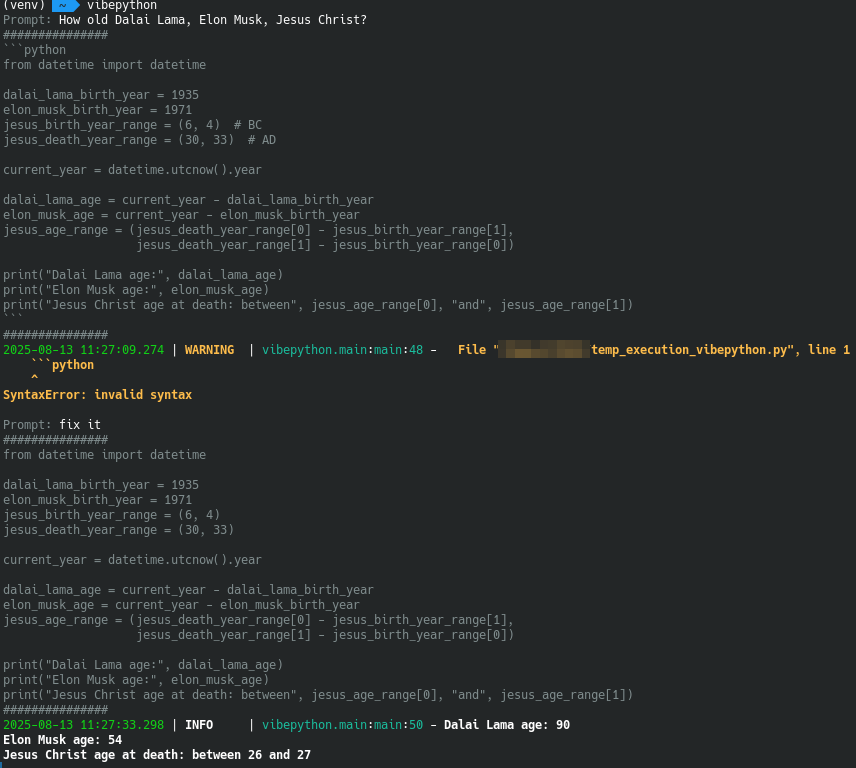
- Interactive Prompting: Enter your ideas and receive AI-generated Python code.
- AI Code Generation: Leverages AI models with prompt history for accurate scripts.
- Safe Code Execution: Run generated code and capture stdout/stderr outputs.
- Persistent History: Uses Pydantic models to store interactions in JSON for ongoing context.
- Customization via Environment Variables: Adjust settings for personalized control.
- Docker Support: Easy deployment in containerized environments.
- Install the package:
pip install vibepython - Run the tool:
vibepython
- Clone the repository:
git clone https://github.com/OldTyT/vibepython.git - Navigate to the directory:
cd vibepython - Install dependencies:
pip install -r requirements.txt - Launch the application:
python3 main.py
Run the container with this command:
docker run --rm -ti -e HISTORY_PATH=/history/history.json -v my_history:/history ghcr.io/oldtyt/vibepython
- Set your OpenAI API key via the
OPENAI_API_KEYenvironment variable (required for the 'openai' provider).
Start the tool and follow the prompts:
- Enter a prompt (e.g., "Write a function to calculate factorial").
- The AI generates code based on your input and history.
- All interactions are logged to history for context.
To exit, press Ctrl+C.
Customize the tool using these environment variables:
| Variable | Default | Description |
|---|---|---|
HISTORY_PATH |
history.json |
Path to the JSON history file. |
HISTORY_SIZE |
7 |
Number of past interactions to include in AI context. |
OPENAI_API_KEY |
None |
Required for the openai provider; your OpenAI API key. |
PROVIDER |
gpt4free |
AI provider to use. Supports gpt4free, ollama and openai. |
MODEL_NAME |
Varies by provider (gpt-4o for gpt4free, gpt-5-mini for openai, llama3 for ollama) |
Model to use with the provider. |
OLLAMA_URL |
http://localhost:11434 |
Ollama URL(only for ollama provider). |
Example configuration:
export PROVIDER=openai
export OPENAI_API_KEY=your-api-key
export MODEL_NAME=gpt-5-mini
export HISTORY_SIZE=10
python3 main.py