
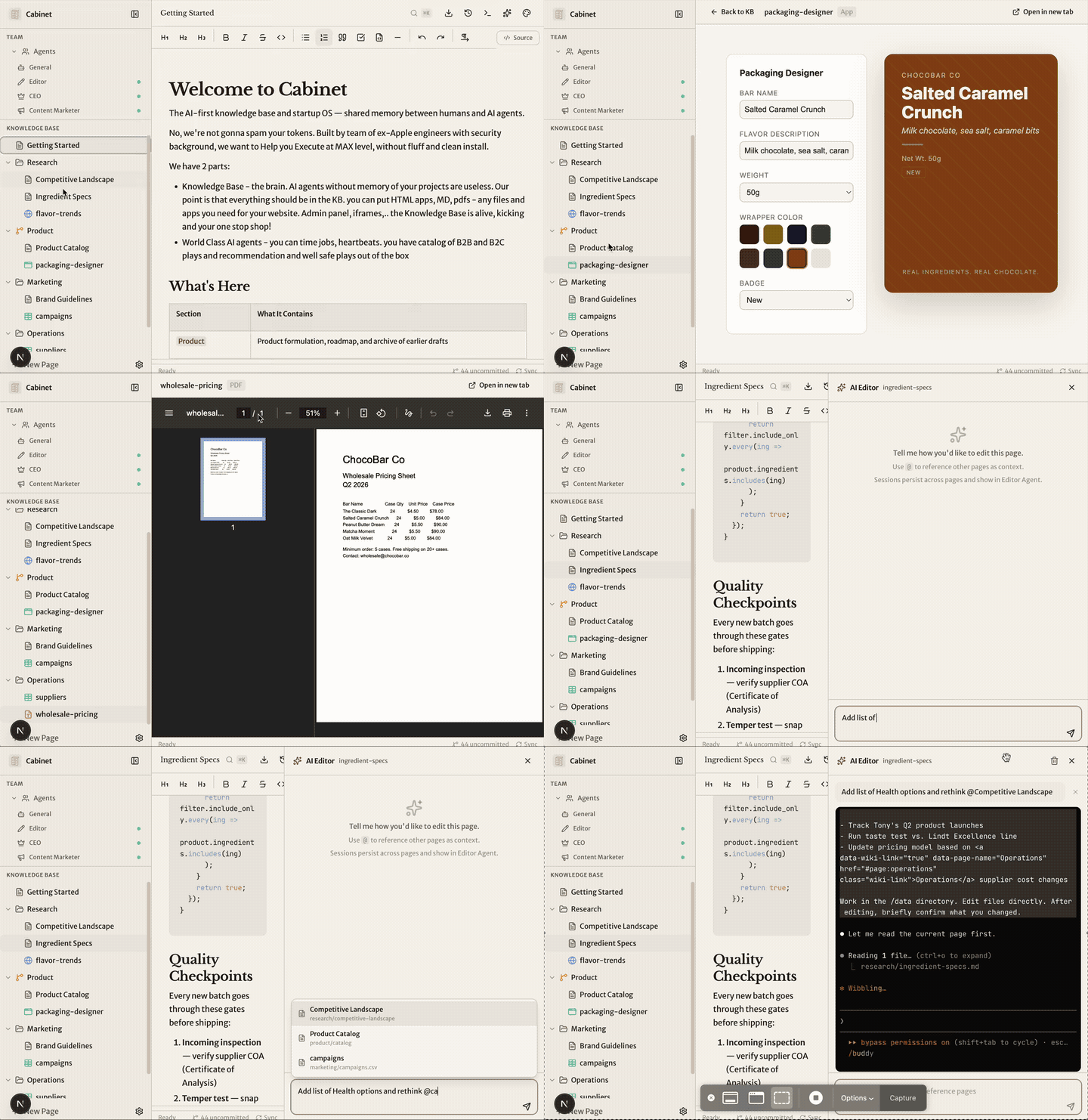
Your knowledge base. Your AI team.
🗂️ Files on disk • 📁 AI workspaces • 🧠 Agents with memory
The AI-first startup OS where everything lives as markdown files on disk. No database. No vendor lock-in. Self-hosted. Your data never leaves your machine.
Built by Hila Shmuel, former Engineering Manager at Apple — now building Cabinet in public, with the open-source community.
@HilaShmuel • runcabinet.com • hi@runcabinet.com




npx create-cabinet@latest
cd cabinet
npm run dev:all
Open http://localhost:4000. The onboarding wizard builds your custom AI team in 5 questions.
Cabinet runs entirely through npx — no global install needed. The CLI is the cabinetai package; create-cabinet is a thin wrapper around it.
npx create-cabinet@latest          # create a cabinet and start it
npx cabinetai create my-startup    # just create, don't start
npx cabinetai run                  # start Cabinet in the current dir
On first run, Cabinet downloads the app to ~/.cabinet/app/v{version}/ and installs its dependencies there. Your cabinet directory is just a folder of markdown files — put it anywhere.
npx cabinetai update # check for and install a newer app versionThe CLI compares your installed app version against cabinet-release.json from the latest GitHub Release.
npx cabinetai uninstall            # remove cached app versions only
npx cabinetai uninstall --all      # also remove global state + telemetry data
npx cabinetai uninstall --yes      # skip the confirmation prompt
npx cabinetai remove               # alias for uninstall
The command prints a summary of what will be deleted and asks for confirmation before doing anything. Your cabinet directories and their data are never touched — those you'd delete manually.
--all additionally removes the platform-specific telemetry directory:
- macOS:
~/Library/Application Support/cabinet-telemetry/ - Windows:
%APPDATA%\cabinet-telemetry\ - Linux:
$XDG_CONFIG_HOME/cabinet/(falls back to~/.config/cabinet/)
To wipe Cabinet completely, run uninstall --all and then rm -rf your cabinet directories yourself.
See docs/CABINETAI.md for the full CLI reference.
Every time you start a new Claude session, it forgets everything. Your project context, your decisions, your research — gone. Scattered docs in Notion. AI sessions with no memory. Manual copy-paste between tools.
One knowledge base. AI agents that remember everything. Scheduled jobs that compound. Your team grows while you sleep.
If it feels like enterprise workflow software, it's wrong. If it feels like watching a team work, it's right.
Cabinet is built around a few principles that we think matter deeply for the future of AI + data tools:
- Yours — Your data stays yours: local, visible, and portable. It’s not trapped inside a particular AI provider’s system with no clean way to get it out. You stay in control of your information.
- Git everything — Memory should have history. You should be able to inspect changes, revert mistakes, audit how knowledge evolves, and treat your AI system like the important infrastructure it is.
- BYOAI — Bring your own AI. Cabinet should work with Claude, Codex, OpenCode, local models, and whatever comes next, without forcing your knowledge into a single provider’s ecosystem.
- KISS — Keep it simple, stupid. AI tools should be understandable, inspectable, and hackable. We prefer plain files, clear behavior, and systems that developers can actually reason about.
- Security — We care deeply about security. If AI is going to work with your documents, research, plans, and internal context, the system should minimize surprise, reduce unnecessary exposure, and make trust a design requirement rather than an afterthought.
- Self-hosted — If AI is going to hold your context, plans, research, and operating memory, it should run in an environment you control.
| Feature | What it does |
|---|---|
| WYSIWYG + Markdown | Rich text editing with Tiptap. Tables, code blocks, slash commands. |
| AI Agents | Each has goals, skills, scheduled jobs. Watch them work like a real team. |
| Skills | Browse and install from skills.sh or any GitHub repo. Attach per agent, or @-mention in the composer to scope to a single task. |
| Scheduled Jobs | Cron-based agent automation. Reddit scout every 6 hours. Weekly reports on Monday. |
| Embedded HTML Apps | Drop an index.html in any folder — it renders as an iframe. Full-screen mode. |
| Web Terminal | Interactive local AI CLI terminal in the browser. Kept for direct sessions, debugging, and future terminal-native features such as tmux-style Cabinet workflows. |
| File-Based Everything | No database. Markdown on disk. Your data is always yours, always portable. |
| Git-Backed History | Every save auto-commits. Full diff viewer. Restore any page to any point in time. |
| Missions & Tasks | Break goals into missions. Track progress with Kanban boards. |
| Internal Chat | Built-in team channels. Agents and humans communicate. |
| Full-Text Search | Cmd+K instant search across all pages. Fuzzy matching. |
| PDF & CSV Viewers | First-class support for PDFs and spreadsheets. |
| Dark/Light Mode | Theme toggle. Dark mode by default. |
This is the biggest difference between Cabinet and tools like Obsidian or Notion. Drop an index.html in any directory — it renders as an embedded app. Full-screen mode with sidebar auto-collapse. AI-generated apps written directly into your KB. Version controlled via git. No build step.
| Feature | Cabinet | Obsidian | Notion |
|---|---|---|---|
| AI agent orchestration | Yes | No | No |
| Scheduled cron jobs | Yes | No | No |
| Embedded HTML apps | Yes | No | No |
| Web terminal | Yes | No | No |
| Self-hosted, files on disk | Yes | Yes | No |
| No database / no lock-in | Yes | Yes | No |
| Git-backed version history | Yes | Via plugin | No |
| WYSIWYG + Markdown | Yes | Yes | Yes |
Cabinet ships with 20 pre-built agent templates. Each has a role, recurring jobs, recommended skills, and a workspace in the knowledge base.
| Department | Agents |
|---|---|
| Leadership | CEO, COO, CFO, CTO |
| Product | Product Manager, UX Designer |
| Marketing | Content Marketer, SEO Specialist, Social Media, Growth Marketer, Copywriter |
| Engineering | Editor, QA Agent, DevOps Engineer |
| Sales & Support | Sales Agent, Customer Success |
| Analytics | Data Analyst |
| Operations | People Ops, Legal Advisor, Researcher |
- Install & Run — One command. Next.js + daemon start.
- Answer 5 Questions — Cabinet builds your custom AI team.
- Watch Your Team Work — Agents create missions, write content, scout Reddit, file reports.
- Knowledge Compounds — Every agent run, every edit adds to the KB. Context builds over time.
Cabinet no longer treats the browser terminal as the only way to run AI work.
- Tasks, jobs, and heartbeats now run through a provider adapter layer with persisted conversations and transcript-driven live views.
- Per-run overrides can choose provider, model, and reasoning effort, while personas and jobs can still inherit defaults.
- Current defaults are structured local adapters:
claude_localfor Claude Code andcodex_localfor Codex CLI. - The web terminal is staying as a first-class interactive surface for direct CLI sessions and future terminal-native features such as Cabinet-managed tmux-like workspaces.
cabinet/
  src/
    app/api/         -> Next.js API routes
    components/      -> React components (sidebar, editor, agents, jobs, terminal)
    stores/          -> Zustand state management
    lib/             -> Storage, markdown, git, agents, jobs
  server/
    cabinet-daemon.ts -> WebSocket + job scheduler + structured adapters + agent executor
    pty/              -> PTY session module (spawn, Claude lifecycle, ansi)
  data/
    .agents/.library/ -> 20 pre-built agent templates
    getting-started/  -> Default KB page
Tech stack: Next.js 16, TypeScript, Tailwind CSS, shadcn/ui, Tiptap, Zustand, xterm.js, node-cron
- Node.js 22+ (LTS). The repo ships an
.nvmrc— runnvm useto auto-switch. Node 20 still works but produces anEBADENGINEwarning from a transitivechevrotain@12pulled in by mermaid. - At least one supported CLI provider:
- Claude Code CLI (
npm install -g @anthropic-ai/claude-code) - Codex CLI (
npm install -g @openai/codexorbrew install --cask codex)
- Claude Code CLI (
- macOS or Linux (Windows via WSL)
cp .env.example .env.local| Variable | Default | Description |
|---|---|---|
KB_PASSWORD |
(empty) | Password to protect the UI. Leave empty for no auth. |
DOMAIN |
localhost |
Domain for the app. |
npm run dev          # Next.js dev server (port 4000 by default)
npm run dev:daemon   # Unified daemon: structured runs, terminal sessions, WebSockets, scheduler (port 4100 by default)
npm run dev:all      # Both servers
npm run build        # Production build
npm run start # Production mode (both servers)Cabinet is free, open source, and self-hosted. Your data never leaves your machine.
npx create-cabinet my-startup
See CHANGELOG.md for breaking changes, or follow the full release history on the documentation site.
Cabinet sends anonymous usage telemetry by default (event counts, versions, platform — never file contents, paths, prompts, or secrets).
To turn it off, pick one:
export CABINET_TELEMETRY_DISABLED=1 # env var (any shell session)…or open Settings → Privacy and toggle Send anonymous usage telemetry
off. To also wipe the local install ID and queue, run
npx cabinetai uninstall --all.
See TELEMETRY.md for the full event list, payload schema, and where data is stored.
Questions, ideas, feedback, screenshots, wild experiments — bring them to the Discord. That’s where the Cabinet community hangs out and where a lot of the product direction gets shaped in real time.
Cabinet is moving fast right now. We’d love thoughtful contributors who want to help shape it early.
If you’re thinking about opening a PR, please start by joining the Discord and talking with Hila before coding. Hila is Cabinet’s builder, and that early sync helps us keep the roadmap coherent while the product is still evolving rapidly.
Once the direction is aligned, open your PR on GitHub. The goal is not gatekeeping — it’s making sure your energy goes into work that has a clear path to landing and shipping.
MIT License