This directory contains a complete Docker Compose setup for running a full Apache Druid cluster locally. This example is perfect for development, testing, and learning about Druid cluster architecture. It is also the perfect companion for tools like Data Philter and the Druid MCP Server, which are AI-powered gateways to simplify your interaction with Apache Druid.
- Complete Druid Cluster: All core Druid services included (Coordinator, Broker, Historical, MiddleManager, Router).
- One-Command Install: Automated scripts for macOS, Linux, and Windows.
- Cross-Platform: Runs anywhere Docker is available.
- Pre-configured: Comes with sensible defaults for local development.
- Basic Security Enabled: Includes a pre-configured admin user (
admin/password). - Ready for Data Philter: Designed to work out-of-the-box with iunera/data-philter.
This method is the easiest way to get your Druid cluster up and running. The script will automatically download the required files, create a dedicated directory for your cluster, and start all the services.
- Docker installed and running.
- For macOS/Linux,
curlorwgetis required.
Open your terminal, and execute the command for your operating system.
curl -sL https://raw.githubusercontent.com/iunera/druid-local-cluster-installer/main/install.sh | shpowershell.exe -NoProfile -ExecutionPolicy Bypass -Command "Invoke-WebRequest -Uri 'https://raw.githubusercontent.com/iunera/druid-local-cluster-installer/main/install.ps1' | Select-Object -ExpandProperty Content | Invoke-Expression"The script will:
- Create a
.druid-local-clusterdirectory in your home folder. - Download the
docker-compose.yamland environment files into it. - Start the Druid cluster using Docker Compose.
- Open the Druid console in your default web browser.
Once the script is finished, your Druid cluster will be accessible at http://localhost:8888.
- Username:
admin - Password:
password
- Docker and Docker Compose installed
- At least 8GB of available RAM
- At least 10GB of free disk space
- Clone or download this repository.
- Navigate to this directory:
cd druid-local-cluster-installer - Start the cluster:
docker compose up -d
- Open the Druid Console and confirm access:
- URL: http://localhost:8888
- Username: admin
- Password: password
Experience your data like never before with Data Philter, a local-first AI gateway designed by iunera. It leverages this Druid MCP Server to provide a seamless, conversational interface for your Druid cluster.
- Natural Language Queries: Ask questions in plain English and get results instantly.
- Local & Secure: Runs completely locally with support for Ollama models (or OpenAI).
- Plug & Play: Works out-of-the-box with the Development Druid Installation.
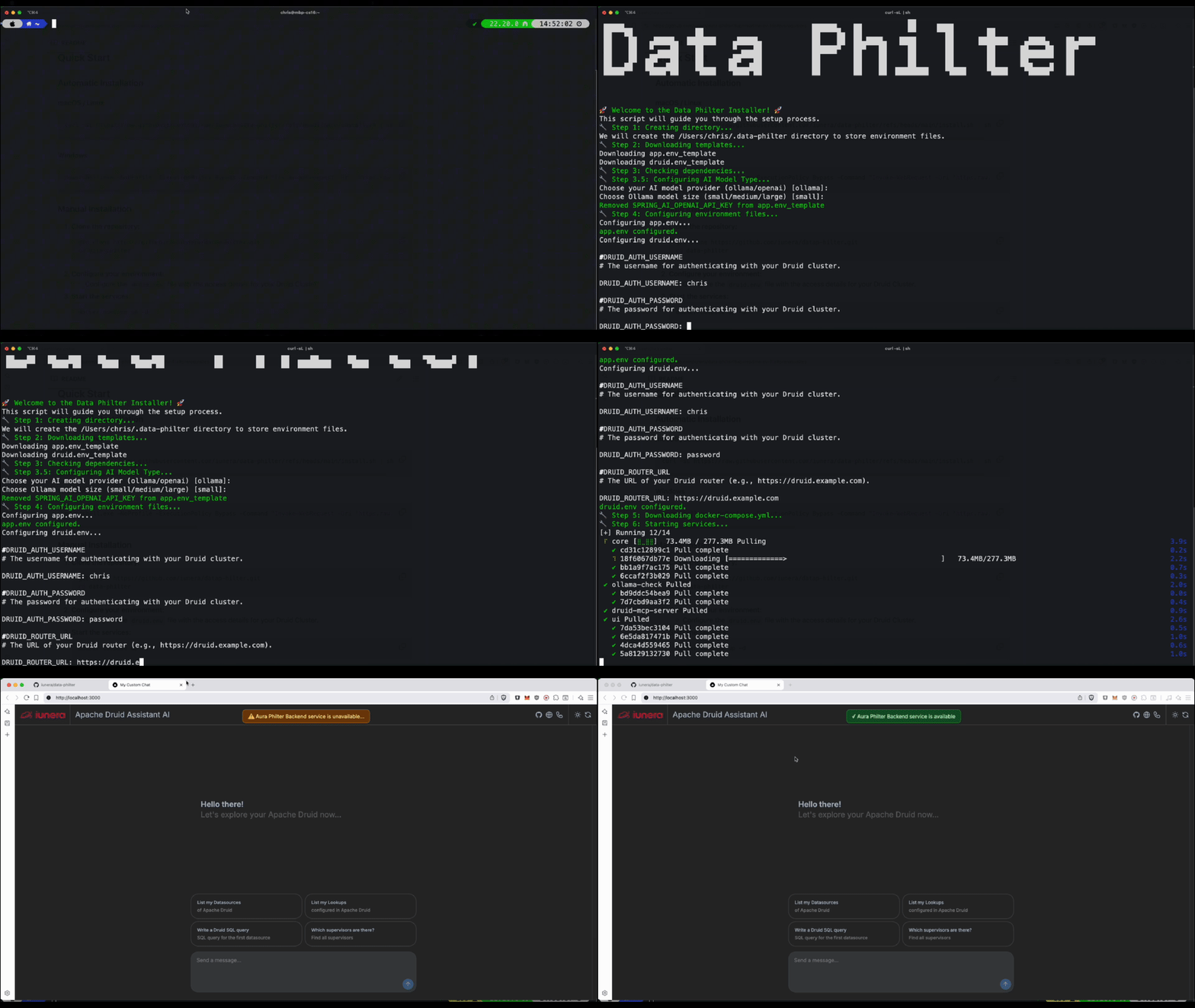
Get Data Philter on GitHub → Watch the Video about Data Philter →
This local Druid cluster is the perfect companion for Data Philter.
- Start this Druid cluster by following the installation steps above.
- Install and configure Data Philter to connect to this local cluster. Edit
~/.data-philter/druid.envand set at least:DRUID_ROUTER_URL=http://localhost:8888 DRUID_SSL_ENABLED=false DRUID_AUTH_USERNAME=admin DRUID_AUTH_PASSWORD=password
- Start Data Philter and open the app:
- App URL: http://localhost:4000
docker compose downTo also remove volumes (delete all data):
docker compose down -v| Service | Container | Image | Purpose | Dependencies |
|---|---|---|---|---|
| PostgreSQL | postgres |
postgres:17 |
Metadata storage | None |
| ZooKeeper | zookeeper |
zookeeper:3.5.10 |
Service coordination | None |
| Coordinator | coordinator |
apache/druid:34.0.0 |
Segment management | postgres, zookeeper |
| Broker | broker |
apache/druid:34.0.0 |
Query processing | postgres, zookeeper, coordinator |
| Historical | historical |
apache/druid:34.0.0 |
Data serving | postgres, zookeeper, coordinator |
| MiddleManager | middlemanager |
apache/druid:34.0.0 |
Task execution | postgres, zookeeper, coordinator |
| Router | router |
apache/druid:34.0.0 |
API gateway | postgres, zookeeper, coordinator |
| Service | Internal Port | External Port | Purpose |
|---|---|---|---|
| Router | 8888 | 8888 | Druid Console & API |
| Volume | Purpose | Mounted Services |
|---|---|---|
metadata_data |
PostgreSQL data persistence | postgres |
druid_shared |
Shared segment storage | coordinator, historical, middlemanager |
coordinator_var |
Coordinator logs and temp files | coordinator |
broker_var |
Broker logs and temp files | broker |
historical_var |
Historical logs and temp files | historical |
middle_var |
MiddleManager logs and temp files | middlemanager |
router_var |
Router logs and temp files | router |
The cluster uses configuration from the environment file. Key settings include:
druid_metadata_storage_type=postgresql
druid_metadata_storage_connector_connectURI=jdbc:postgresql://postgres:5432/druid
druid_metadata_storage_connector_user=druid
druid_metadata_storage_connector_password=FoolishPassworddruid_zk_service_host=zookeeperdruid_storage_type=local
druid_storage_storageDirectory=/opt/shared/segments
druid_indexer_logs_directory=/opt/shared/indexing-logsDRUID_SINGLE_NODE_CONF=micro-quickstart
druid_processing_numThreads=2
druid_processing_numMergeBuffers=2This example enables Druid Basic Security with initial credentials for convenience:
# Initial admin user and internal client passwords
druid_auth_authenticator_MyBasicMetadataAuthenticator_initialAdminPassword=password
druid_escalator_internalClientPassword=internal
Default login for the Druid Console:
- Username: admin
- Password: password
To modify the cluster configuration:
- Edit the
environmentfile - Restart the cluster:
docker compose down
docker compose up -d
# Check service logs
docker compose logs [service-name]

# Check all services status
docker compose ps- Increase Docker memory allocation to at least 8GB
- Modify memory settings in the
environmentfile
- Ensure port 8888 (Druid Router) is not in use by other applications
- Modify port mappings in
docker-compose.yamlif needed
# Remove all volumes and start fresh
docker compose down -v
docker compose up -dCheck if all services are running:
# View running containers
docker compose ps

# Check specific service logs
docker compose logs coordinator
docker compose logs broker

# Follow logs in real-time
docker compose logs -fMonitor resource usage:
# View resource usage
docker stats

# Check Druid metrics via API
curl http://localhost:8888/status/healthOnce the cluster is running, you can test it with sample data:
- Go to http://localhost:8888
- Click "Load data" → "Batch - classic"
- Use the sample data provided in Druid tutorials
# Stop and remove containers, networks, and volumes
docker compose down -v --rmi allWe welcome contributions! If you would like to contribute, please feel free to create a pull request.
This project is licensed under the Apache License 2.0. See the LICENSE file for details.
This Docker Compose example is developed and maintained by iunera, a leading provider of advanced AI and data analytics solutions.
iunera specializes in:
- AI-Powered Analytics: Cutting-edge artificial intelligence solutions for data analysis
- Enterprise Data Platforms: Scalable data infrastructure and analytics platforms (Druid, Flink, Kubernetes, Kafka, Spring)
- Model Context Protocol (MCP) Solutions: Advanced MCP server implementations for various data systems
- Custom AI Development: Tailored AI solutions for enterprise needs
As veterans in Apache Druid iunera deployed and maintained a large number of solutions based on Apache Druid in productive enterprise grade scenarios.
Maximize your return on data with professional Druid implementation and optimization services. From architecture design to performance tuning and AI integration, our experts help you navigate Druid's complexity and unlock its full potential.
For more information about our services and solutions, visit www.iunera.com.
Need help? Let us know!
- Website: https://www.iunera.com
- Professional Services: Contact us through email for Apache Druid enterprise consulting, support and custom development
- Open Source: This project is open source and community contributions are welcome
© 2025 iunera. Licensed under the Apache License 2.0.