A custom Home Assistant Lovelace card for displaying weather alerts with severity indicators, progress bars, and expandable details. Supports NWS (US), BoM (Australia), MeteoAlarm (Europe), DWD (Germany), ECCC (Canada), PirateWeather, and CAP Alerts (multi-region).
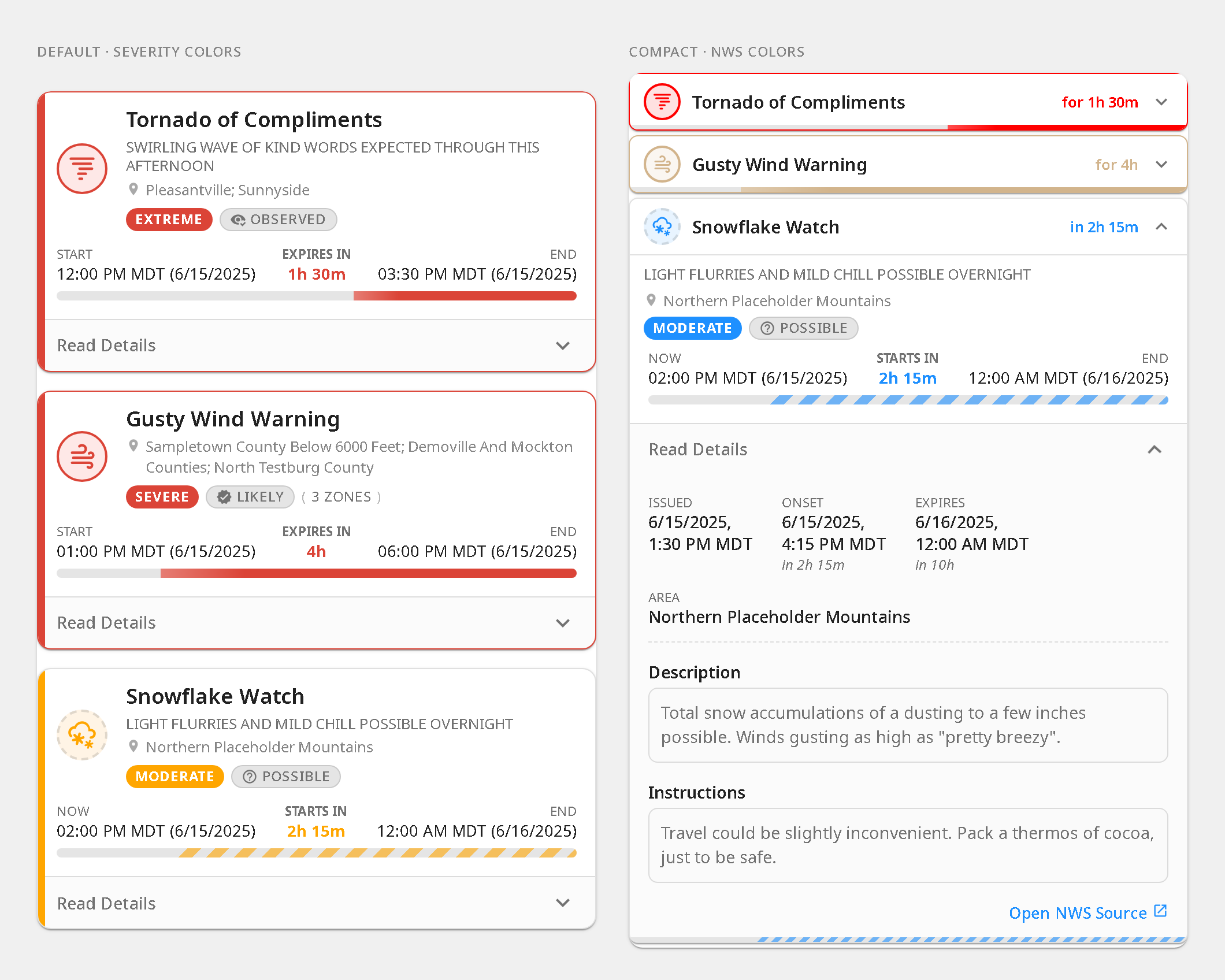
- Multi-provider — NWS (US), BoM (Australia), MeteoAlarm (Europe), DWD (Germany), ECCC (Canada), PirateWeather, and CAP Alerts (multi-region) with auto-detection
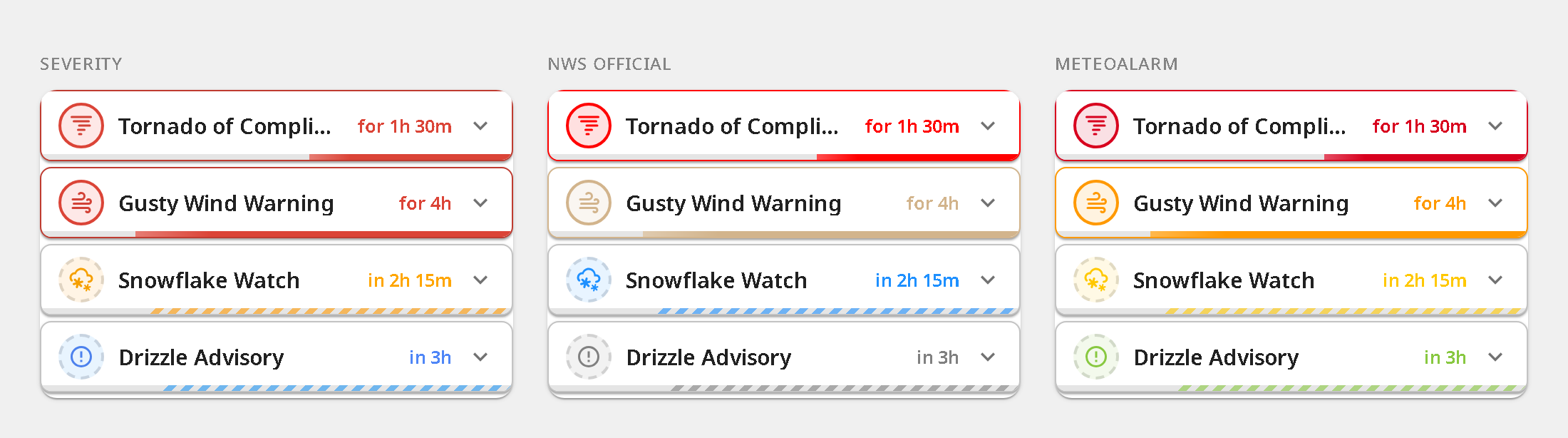
- Color themes — severity-based (default), NWS official event colors, MeteoAlarm awareness level colors, or ECCC public-alert colors
- Time progress bars — elapsed/remaining time with relative and absolute timestamps
- Alert headlines — contextual subtitle from provider data, with optional redundancy filtering
- Expandable details — sanitized description, instructions, and source link
- BoM phase badges — New, Updated, Renewed lifecycle indicators
- Compact layout — collapsed single-row alerts with progress bars that expand on tap
- Zone filtering (BoM) — show only alerts for specific
area_idzones - Dismissable alerts — optional per-alert dismiss (button or swipe) with undo and a restore-all control, stored browser-locally
- Sort order — default, onset time, or severity
- Severity threshold — minimum severity to display (unclassified alerts always shown)
- Localized UI — English, French, Spanish, Italian, and German; auto-detected from Home Assistant locale
- Visual config — no YAML editing required
- Install a weather alerts integration for your region (see Supported Providers)
- Install this card via HACS: search "Weather Alerts Card"
- Add to your dashboard and select your alert entity

Then click the Download button, and click Reload when prompted.
- Download
weather-alerts-card.jsfrom the latest release - Copy to
config/www/weather-alerts-card.js - Add as resource: Settings → Dashboards → Resources → URL:
/local/weather-alerts-card.js, Type: JavaScript Module
| Option | Default | Description |
|---|---|---|
entity |
(required, unless device is set) |
Alert sensor entity |
entities |
— | Additional alert entities to merge (e.g. DWD current + advance) |
device |
— | HA device_id — auto-discovers all per-alert sensors under that device and re-discovers as alerts come and go. Currently only the CAP Alerts integration uses this shape. Can be combined with entity/entities or used on its own. |
provider |
auto-detect | 'nws', 'bom', 'meteoalarm', 'dwd', 'eccc', 'pirateweather', 'cap' |
title |
— | Card header title |
zones |
— | BoM area_id codes to filter (e.g. NSW_FL049) |
sortOrder |
'default' |
'default', 'onset', 'severity' |
minSeverity |
'all' |
'all', 'minor', 'moderate', 'severe', 'extreme'. Alerts whose severity is unknown/unclassified are always shown, regardless of this threshold |
colorTheme |
'severity' |
'severity', 'nws', 'meteoalarm', 'eccc' — 'eccc' uses ECCC's published red/orange/yellow/grey palette (matches weather.gc.ca); falls back to the canonical severity tier for non-ECCC alerts displayed under this theme |
enhanceContrast |
'subtle' |
'off', 'subtle', 'strict' — boost foreground colors for NWS/MeteoAlarm events whose raw hex reads poorly against the active theme's card background, applied per event, per theme mode, and only in the direction where it fails. 'subtle' (default) uses a text tier (~2:1 for icon/label) and a stricter progress tier (~1.3:1 for progress-bar fill, which catches near-invisible tints like yellow Tornado Watch). 'strict' tightens both tiers (text ~3:1, progress ~2:1) toward WCAG AA-ish guarantees. 'off' always renders raw theme hex values. Events that already read cleanly (e.g. Tornado Warning) render unchanged in all modes. |
eventCodes |
— | Event codes to include, e.g. ['SVR', 'TOR'] (NWS) or ['31', '95'] (DWD) |
excludeEventCodes |
— | Event codes to exclude, e.g. ['SCY'] (NWS) or ['22'] (DWD) |
timezone |
'server' |
'server' or 'browser' (client's local time) |
deduplicateHeadlines |
true |
Suppress headlines that repeat the event name |
deduplicate |
true |
Collapse matching alerts across zones and providers |
animations |
system | true, false, or respect prefers-reduced-motion |
showDetails |
true |
Show the expandable detail panel (hides entire "Read Details" section when false) |
expandDetails |
false |
Always show details inline without a toggle (ideal for wall-mounted displays) |
showProvider |
false |
Show provider label (e.g., NWS) above event title |
showMetadata |
true |
Show issued/onset/expires/area grid in detail panel |
showDescription |
true |
Show description text in detail panel |
showInstructions |
true |
Show instructions text in detail panel |
showGeometry |
false |
Show an inline SVG mini-map of the affected-area outline in the detail panel. CAP Alerts (cap_alerts) only — other providers have no geometry. Draws the bbox frame immediately and overlays the polygon once fetched out-of-band (falls back to the frame on cache miss). |
geometryStyle |
'shape' |
Mini-map rendering when showGeometry is on. 'shape': bare polygon outline, fully offline. 'map': raster-tile basemap behind the polygon for geographic context — opt-in, fetches map tiles (online), and reveals the alert's bounding box to the tile host. Falls back to the outline if tiles fail. |
geometryTileUrl |
CARTO | Slippy-map tile template ({z}/{x}/{y}, optional {s}) used when geometryStyle: 'map'. Default is the theme-aware CARTO basemap that Home Assistant's own map uses (light_all/dark_all, CORS-enabled). Override to point at a self-hosted or proxied tile source. |
geometryTileAttribution |
© OpenStreetMap, CARTO |
Attribution label shown over the map. Set this to credit your provider when using a custom geometryTileUrl. |
showSourceLink |
true |
Show "Open Source" link (false for kiosk mode) |
hideExpired |
true |
Hide expired alerts (set false to show them dimmed) |
hideNoAlerts |
false |
Hide the "No active alerts" banner when there are no alerts |
fontSize |
'default' |
'small', 'default', 'large', 'x-large' — scales text and icons |
reformatText |
true |
Strip hard line wraps from alert text (NWS 69-char teletype breaks) while preserving paragraph breaks |
layout |
'default' |
'default' or 'compact' |
allowDismiss |
false |
Let users dismiss individual alerts (browser-local). Adds a × button and/or swipe gesture |
dismissTrigger |
'button' |
'button', 'swipe', or 'both' — how an alert is dismissed (swipe covers touch + mouse drag). Requires allowDismiss |
dismissButtonStyle |
'icon' |
'icon' or 'labeled' (icon + "Dismiss" text). No effect when dismissTrigger: 'swipe'; compact layout is always icon-only |
showDismissUndo |
true |
Show an Undo toast when an alert is dismissed. No effect when allowDismiss is off |
Examples
Basic
type: custom:weather-alerts-card
entity: sensor.nws_alerts_alerts
BoM with title and zone filtering
type: custom:weather-alerts-card
entity: sensor.sydney_warnings
provider: bom
title: Weather Alerts
zones:
  - NSW_FL049
NWS official colors, compact, sorted by severity
type: custom:weather-alerts-card
entity: sensor.nws_alerts_alerts
colorTheme: nws
layout: compact
sortOrder: severity
NWS filtered to specific event types, browser timezone
type: custom:weather-alerts-card
entity: sensor.nws_alerts_alerts
eventCodes:
  - TOR
  - SVR
timezone: browser
European MeteoAlarm warnings with awareness colors
type: custom:weather-alerts-card
entity: binary_sensor.meteoalarm
colorTheme: meteoalarm
Australian BoM warnings
type: custom:weather-alerts-card
entity: sensor.sydney_warnings
provider: bom
DWD (Germany)
type: custom:weather-alerts-card
entity: sensor.dwd_weather_warnings_hamburg_current
DWD current + advance warnings merged
type: custom:weather-alerts-card
entity: sensor.dwd_weather_warnings_current
entities:
  - sensor.dwd_weather_warnings_advance
ECCC (Canada)
type: custom:weather-alerts-card
entity: sensor.marathon_alerts
ECCC with the official public-alert palette
type: custom:weather-alerts-card
entity: sensor.marathon_alerts
colorTheme: eccc
PirateWeather alerts
type: custom:weather-alerts-card
entity: sensor.pirateweather_alerts
CAP Alerts — auto-discover all per-alert sensors under a device
The CAP Alerts integration creates one sensor per active alert under a Home Assistant device. Point the card at the device and it picks up every active alert sensor automatically — and re-picks them up as alerts are issued or cleared.
type: custom:weather-alerts-card
device: 1a2b3c4d5e6f7a8b9c0d1e2f3a4b5c6d
Pick the device from the editor's CAP Alerts device selector to avoid hand-typing
the id. device can also coexist with entities: for mixed setups.
Match Bubble Card styling (requires card-mod)
Show snippet
Styles this card to visually match Bubble Card's large layout — 28px corners, 56px rows, 42×42 icon chip. Note: the selectors below reach into this card's internal CSS class names, which aren't a stable public API and may change between releases. Contributed in #144.
type: custom:weather-alerts-card
entity: sensor.nws_alerts_alerts
sortOrder: severity
layout: compact
provider: nws
card_mod:
  style: |
    ha-card {
      background: transparent !important;
      border: none !important;
      border-radius: 28px !important;
      box-shadow: none !important;
    }
    .alert-card {
      background: rgb(40, 40, 40) !important;
      border: none !important;
      border-radius: 28px !important;
      box-shadow: none !important;
      overflow: hidden !important;
      min-height: 56px !important;
      margin: 0 0 8px !important;
    }
    .alert-card:last-child {
      margin-bottom: 0 !important;
    }
    .alert-header-row {
      min-height: 0 !important;
      height: 56px !important;
      padding: 0 12px 0 8px !important;
    }
    .icon-box {
      width: 42px !important;
      height: 42px !important;
      flex: 0 0 42px !important;
      --mdc-icon-size: 24px !important;
    }
    .icon-box ha-icon {
      --mdc-icon-size: 24px !important;
      width: 24px !important;
      height: 24px !important;
    }
    .compact-time {
      font-size: 13px !important;
}The card auto-detects the provider from entity attributes. Any integration that produces a compatible data shape will work.
| Provider | Region | Tested integrations |
|---|---|---|
| NWS | US | finity69x2/nws_alerts |
| BoM | Australia | bremor/bureau_of_meteorology, safepay/ha_bom_australia |
| MeteoAlarm | Europe | Built-in meteoalarm |
| DWD | Germany | Built-in dwd_weather_warnings |
| ECCC | Canada | HACS michaeldavie/environment_canada_hacs — not the bundled HA core integration; see note below |
| PirateWeather | Global | Pirate-Weather/pirate-weather-ha |
| CAP Alerts | Multi-region (NWS, ECCC, MeteoAlarm) | seevee/cap_alerts — one sensor per active alert; pair with device: for auto-discovery |
Note on ECCC. The HA core
environment_canadaintegration does not currently expose alert details. Until the upstream PR #164481 lands, the HACS custom component is the supported source.
Severity and certainty badges are always localized to your configured language. When a value was inferred by the card's adapter logic (rather than provided directly by the alert source), it is rendered with italic text and a tilde prefix (~Moderate) so you can tell at a glance which badges reflect actual provider data.
| Provider | Severity | Certainty |
|---|---|---|
| NWS | Raw (from Severity field) |
Raw (from Certainty field) |
| BoM | Inferred (parsed from title/type/group) | Absent |
| MeteoAlarm | Raw (from awareness_level or severity) |
Raw (from certainty) |
| DWD | Raw (from integer level) |
Absent |
| ECCC | Derived (max of color, type, impact; tilde only when all three absent) |
Mapped from confidence (High → Likely, Moderate → Possible, Low → Unlikely) |
| PirateWeather | Raw (from severity field) |
Absent |
| CAP Alerts | Raw (from severity_normalized / severity) |
Raw (from certainty field) |
npm install
npm run build     # bundle → dist/weather-alerts-card.js
npm run watch     # bundle with file watching
npm run lint # TypeScript type-checkv3.0.0 removes backwards-compatibility shims that were deprecated in v2. If you are upgrading from v1.x or v2.x, make the following changes:
1. Card type rename (v1.x users only)
Change the card type in your dashboard YAML:
# Before
type: custom:nws-alerts-card

# After
type: custom:weather-alerts-card
2. headline config key removed (v1.x users only)
The headline key was replaced by deduplicateHeadlines in v2. If your card config still has headline:, rename it:
# Before
headline: true   # or false

# After
deduplicateHeadlines: true   # or false
3. Manual install only: resource filename changed
If you installed manually (not via HACS), update the resource path in Settings → Dashboards → Resources:
| Before | After |
|---|---|
/local/nws-alerts-card.js |
/local/weather-alerts-card.js |
HACS users: no action needed — HACS manages the resource path automatically.
If you find this card useful, tip me at Ko-fi to support development, or donate to The Y'all Squad — a rapid-response program providing direct aid, chainsaws, and supplies to families affected by severe weather events.
Resources: Home Assistant Community thread
