🚨⚠️ Users Moving from the old tracker, and those updating from 3.x to 4.x - please refer to the Database Migration Guide.⚠️ 🚨
A comprehensive resource management and tracking portal with Discord authentication and role-based access control. Perfect for gaming communities, organizations, and teams that need to track shared resources, inventory, or assets.
Made for Dune: Awakening. Originally forked from https://github.com/theyetty and adapted to the specific needs of my guild.
Removed from fork network due to original author repository being deleted, and database/backend changes incompatible with other forks.
Redesigned Resource Cards & Sparklines
- Redesigned Grid Cards: Completely overhauled resource grid cards for both desktop and mobile. The new layout features a status-keyed accent left border, inline status chips with colored indicator dots, large monospace quantity totals, and cleaner color-coded progress bars.
- Sparkline Trend Charts: Introduced dynamic, responsive sparklines to resource grid cards to visualize 30-day historical trends (powered by a new batch fetch endpoint). To preserve UI layout consistency, cards with insufficient data display a blurred, deterministic synthetic curve paired with a "NOT ENOUGH HISTORICAL DATA" overlay.
- Consistent Tier Badging: Image thumbnails in the Table view now feature a tier pill overlaid on the corner to match the new grid card design.
- Enhanced Detail View: The primary image container on the Resource Details page has been updated to be larger (160×160 px), rounded, and includes the new corner tier pill overlay.
Security dependency updates
- Security Patches: Resolved CVE-2026-41305 (PostCSS XSS), GHSA-w5hq-g745-h8pq (uuid buffer bounds), and CVE-2026-33750 (brace-expansion ReDoS) via package overrides.
- Native Fetch API: Removed the
node-fetchdev dependency in favor of the Node 22 native fetch API.
Sidebar Navigation & Improved Resource History Chart
- Sidebar Navigation: Replaced the top navigation bar with a collapsible sidebar on desktop and a slide-out drawer on mobile. The sidebar provides consistent navigation to Dashboard, Resources, Leaderboard, Activity, Settings, and Privacy from every page.
- Enhanced History Chart: Improved the Resource Details quantity-over-time chart with a proper coordinate system (
viewBox), dashed grid lines, Y-axis labels, X-axis date labels, a dashed target line, path-based series rendering, and a legend below the chart. - Informative CSV Exports: CSV export now includes a read-only 'tier' column showing the human-readable tier/grade label (e.g. "Grade 4", "Tier 3 (Steel)") to help identify resources that share the same name but differ by grade. The column is ignored on import.
Dynamic Inventory Locations, Category Expansion, & Dependency Updates
- Custom Inventory Locations: Admins can now dynamically rename the two inventory locations via the Settings page (
/dashboard/settings). The UI (tables, modals, and activity logs) now reads these location names from a shared React Context rather than using hardcoded values. - Rapid Resource Templating: Admins can now duplicate an existing resource directly from its detail page using a pre-filled modal.
- Expanded Categories & Subcategories: * Renamed the legacy "Blueprints" category to "Gear Blueprints".
- Added three new resource categories: "Gear", "Augmentations", and "Augmentation Blueprints", each complete with subcategory mapping.
- Expanded Resource Tiers: Renamed Tier 6 to "Tier 6/Grade 0 (Plastanium)" and introduced Graded support with Grade 1 through Grade 5 options (values 7–11).
- Agnostic Database Schema: Introduced
quantityLocation1andquantityLocation2columns to the database schema to replace hardcoded "Hagga" and "Deep Desert" columns. - Seamless API Fallbacks: All backend routing (resources, history, leaderboard, and activity) has been refactored to dual-read and dual-write across the legacy and new location schemas, ensuring a seamless, zero-downtime transition. Read operations dynamically fallback to legacy values if new columns are not yet populated.
- Automated Data Backfill: Implemented an idempotent background migration script (
scripts/backfill-inventory-locations.ts) that runs automatically during the Vercel build pipeline to copy legacy inventory stock and history over to the new schema columns. - TypeScript 6.0 Upgrade: Upgraded TypeScript to
6.0.2and implementedtypes/vendor.d.tsfor side-effect-only imports. - ESLint 10.0 Upgrade: Upgraded ESLint to
10.1.0and migratedeslint.config.mjsto utilize native flat config combined with@typescript-eslint/parser. - Dependency Bumps: * Updated
drizzle-ormto0.45.2.- Updated
lucide-reactto1.7.0(swapping the deprecated Github icon forFaGithub). - Applied security patches for
picomatch(2.3.2).
- Updated
See lib/changelog.json for previous update history.
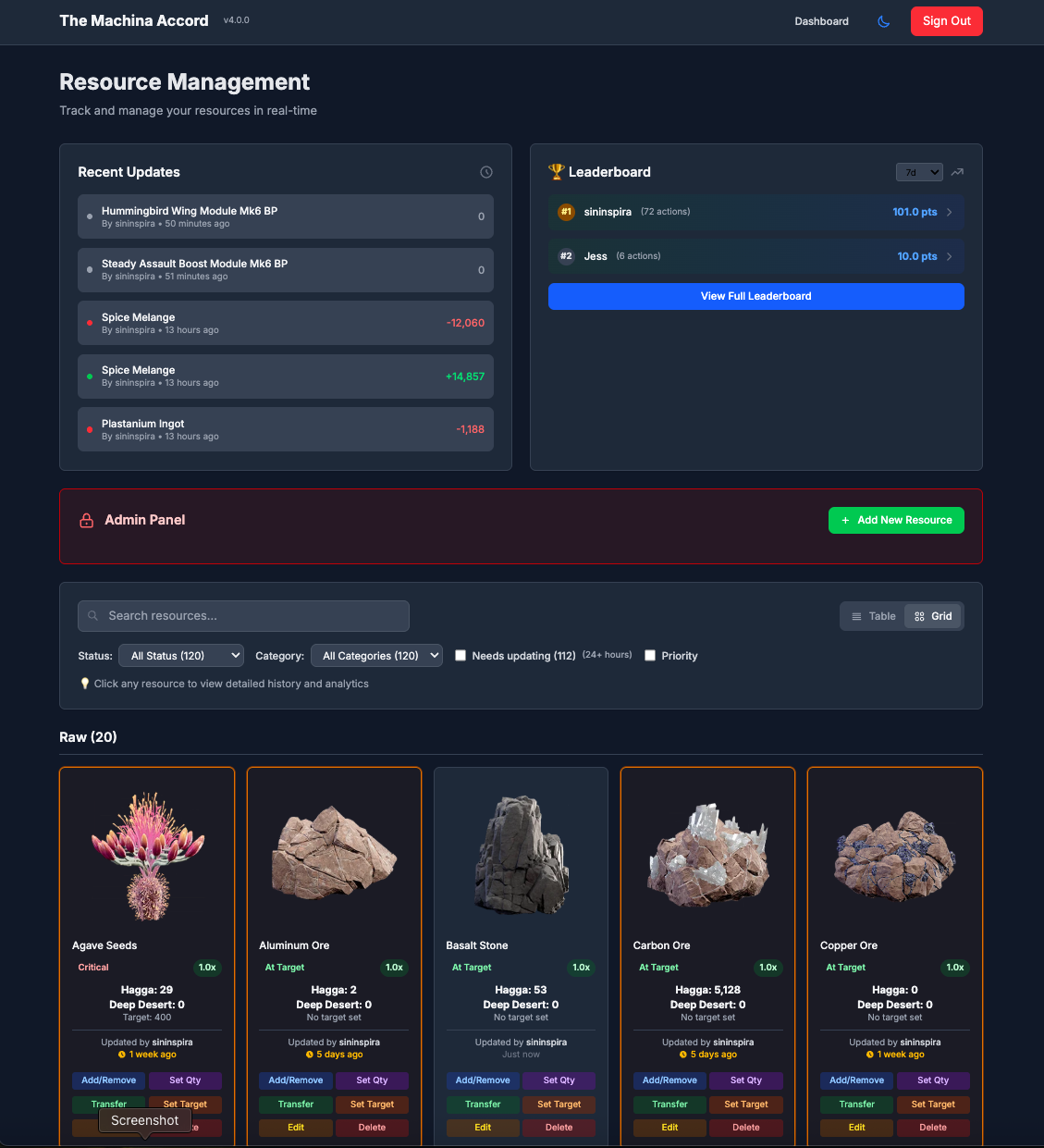 The main resource management grid.
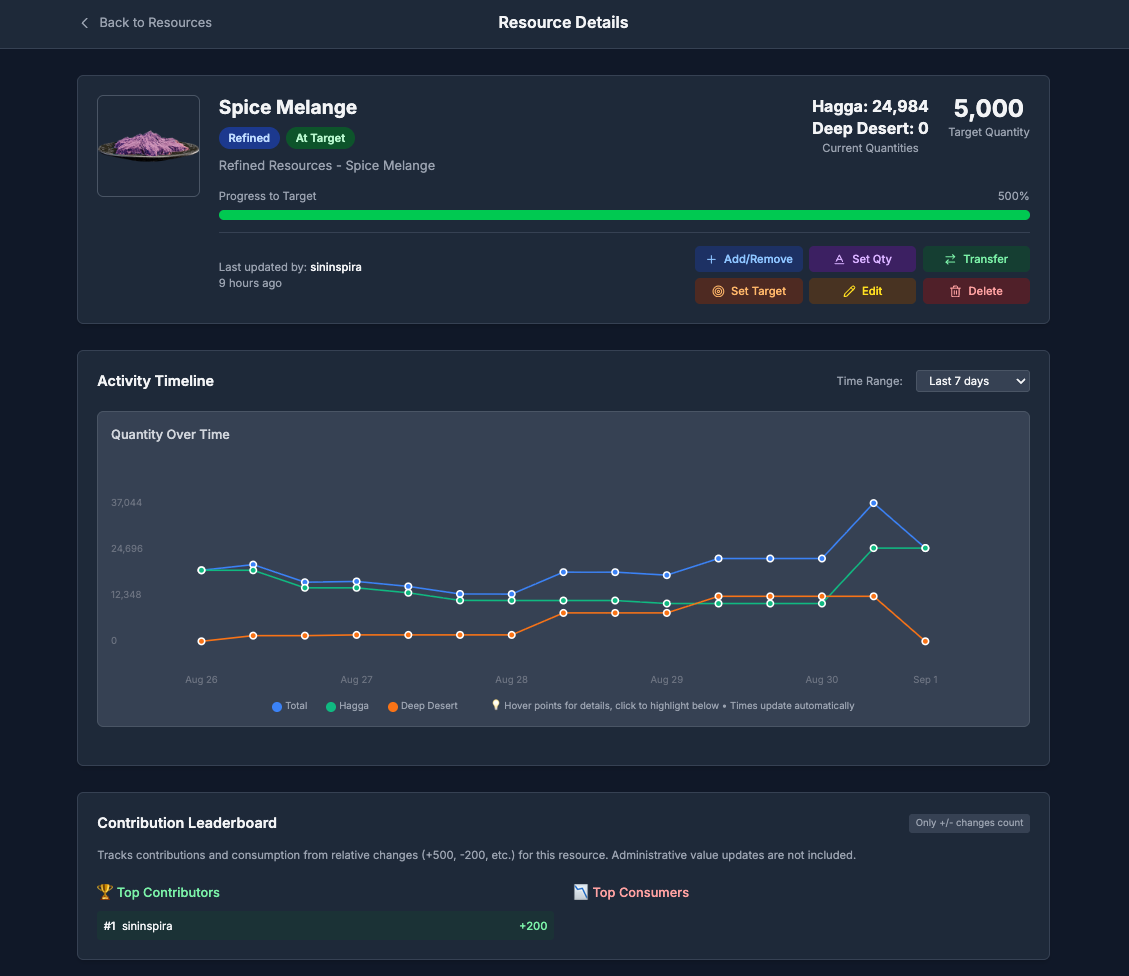 Detailed view with activity timeline and contribution stats.
- Discord OAuth Authentication - Secure login with Discord.
- Role-Based Access Control - Granular permissions managed through your Discord server roles.
- Resource Management - Track quantities across two locations with visual status indicators.
- Activity Logging - Complete audit trail of all user actions with time filtering.
- GDPR Compliance - Tools for user data export and deletion.
- Grid & Table Views - Multiple layouts to view and manage resources.
- Interactive Charts - Visualize resource history with interactive data points.
- Gamification - A points-based leaderboard system to encourage contributions.
- Admin Controls - Full control over resources, targets, and user data for authorized roles.
- Responsive Design - Modern UI optimized for desktop and mobile devices.
This guide will walk you through deploying your own instance of the Resource Tracker for free using Vercel and Turso.
Before you start, make sure you have the following installed:
- Node.js: Version 22.x LTS is required. You can download it from nodejs.org.
- Git: Required for cloning the repository. Download it from git-scm.com.
- A code editor: Such as VS Code.
- Fork the project: Click the "Fork" button at the top-right of this page to create your own copy.
- Clone your fork: Open your terminal or command prompt and run the following command, replacing
YOUR_USERNAMEwith your GitHub username:git clone https://github.com/YOUR_USERNAME/ResourceTracker.git cd ResourceTracker
- Navigate to the Discord Developer Portal and click "New Application".
- Give your application a name (e.g., "My Guild's Resource Tracker").
- Go to the "OAuth2" tab.
- Copy the Client ID and Client Secret. You will need these later.
- Under Redirects, add the following URL:
http://localhost:3000/api/auth/callback/discord. We will update this with our production URL later.
- Enable Developer Mode in Discord: Go to
User Settings > Advancedand turn on "Developer Mode". - Copy Server ID: Right-click your Discord server icon and select "Copy Server ID".
- Copy Role IDs: In your server settings, go to
Roles, right-click a role you want to configure, and select "Copy ID". You'll need at least one role for basic access. For more details, see the role configuration guide.
- Sign up for a free account at turso.tech. The free tier is very generous.
- Click "Create Database".
- Choose a name (e.g.,
resource-tracker-db) and select the region closest to you. - Once created, copy the Database URL (starts with
libsql://) and generate and copy an Auth Token.
- Go to vercel.com and sign up with your GitHub account.
- Click "Add New... > Project" and import your forked repository.
- In the "Configure Project" screen, expand the Environment Variables section. Add all variables from the table below, but leave
NEXTAUTH_URLempty for now.
| Variable Name | Value | Description |
|---|---|---|
DISCORD_CLIENT_ID |
From Step 2 | Your Discord application's Client ID. |
DISCORD_CLIENT_SECRET |
From Step 2 | Your Discord application's Client Secret. |
DISCORD_GUILD_ID |
From Step 3 | Your Discord server's ID. |
DISCORD_ROLES_CONFIG |
See note below | Single-line JSON for role permissions. See ENVIRONMENT.md. |
NEXTAUTH_URL |
Leave this blank for now. | The production URL of your Vercel app. |
NEXTAUTH_SECRET |
Generate a secret | Run openssl rand -base64 32 in your terminal to create one. |
TURSO_DATABASE_URL |
From Step 4 | Your Turso database URL. |
TURSO_AUTH_TOKEN |
From Step 4 | Your Turso database authentication token. |
NEXT_PUBLIC_ORG_NAME |
Your choice | Your community or organization's name. |
Important: For
DISCORD_ROLES_CONFIG, the JSON must be on a single line. Start with a simple configuration for a single admin role:[{"id":"YOUR_ADMIN_ROLE_ID","name":"Admin","level":100,"isAdmin":true,"canAccessResources":true,"canEditTargets":true}]
- Click Deploy.
- Set Node.js Version: After the first deployment, go to your project's Settings > General on Vercel, set the Node.js Version to 22.x.
- Once the deployment is complete, go to your project's dashboard on Vercel and copy the primary domain (e.g.,
https://your-project.vercel.app). - Go back to your project's Settings > Environment Variables.
- Add a new environment variable:
NEXTAUTH_URLand paste the domain you just copied. - Redeploy: Go to the Deployments tab, click the latest deployment, and select "Redeploy" from the menu. This ensures the new
NEXTAUTH_URLvariable is applied.
- Install dependencies locally: From the local pronect folder that you cloned in Step 1:
npm install
- Create
.env.localfile: In your local project folder, create a file named.env.localand add your Turso credentials:TURSO_DATABASE_URL=your_turso_database_url TURSO_AUTH_TOKEN=your_turso_auth_token - Run the Database Migration: This command creates and sets up the database schema.
# Applies all existing migrations to create the schema and logs them.
npm run db:migrate
You can add some initial data to see how the application works.
# For Dune-specific resources
npm run populate-resources-dune

# For Tier-6 Blueprints
npm run populate-blueprints-dune- Go back to the Discord Developer Portal and select your application.
- In the "OAuth2" tab, under Redirects, add your production Vercel URL you configured in Step 6:
https://your-app-name.vercel.app/api/auth/callback/discord
Your Resource Tracker is now live! Visit your Vercel URL to sign in with Discord.
For contributing or making customizations, follow these steps to run the project locally.
-
Install dependencies:
npm install
-
Configure environment: Create a
.env.localfile in the root of your project. This file stores your secret keys and configuration for local development. Copy the example below and fill in your actual values.# .env.local # Discord OAuth (from your Discord Developer Application) DISCORD_CLIENT_ID=your_discord_client_id DISCORD_CLIENT_SECRET=your_discord_client_secret DISCORD_GUILD_ID=your_discord_server_id # Discord Roles (single-line JSON - see ENVIRONMENT.md for details) # Example with an Admin and a Member role: DISCORD_ROLES_CONFIG=[{"id":"1234567890","name":"Admin","level":100,"isAdmin":true,"canEditTargets":true,"canAccessResources":true},{"id":"0987654321","name":"Member","level":1,"isAdmin":false,"canEditTargets":false,"canAccessResources":true}] # NextAuth (generate secret with: openssl rand -base64 32) NEXTAUTH_URL=http://localhost:3000 NEXTAUTH_SECRET=your_super_secret_key_generated_with_openssl # Turso Database (from your Turso dashboard) TURSO_DATABASE_URL=libsql://your-database.turso.io TURSO_AUTH_TOKEN=your_turso_auth_token # Optional: Customize branding for your local instance NEXT_PUBLIC_ORG_NAME=Dev Community
For a detailed explanation of all variables, see ENVIRONMENT.md.
-
Set up the database:
# Applies all existing migrations to create the schema and logs them. npm run db:migrate -
Start the development server:
npm run dev
The app will be available at
http://localhost:3000.
This application is designed to be easily customized:
- Branding: Set
NEXT_PUBLIC_ORG_NAMEfor your organization's name. - Roles: Configure permissions in
DISCORD_ROLES_CONFIG. - Resources: Modify the population scripts in the
/scriptsfolder to fit your needs. - Styling: Update colors and themes in
tailwind.config.jsandapp/globals.css.
For more details, see the Customization Guide.
- ENVIRONMENT.md: Full guide to all environment variables.
- DB_MIGRATION.md: IMPORTANT guide for users upgrading from older versions.
- CONTRIBUTING.md: Guidelines for contributing to the project.
- docs/: In-depth documentation on architecture, API, and more.
We welcome contributions! Please see CONTRIBUTING.md for guidelines on how to contribute to this project.
This project is open source and available under the MIT License.


