- Introduction
- Why C and Python?
- RT-GSFit vs GSFit
- Program Layout and Flow
- Tests
- Programming Conventions and Style Recommendation
- To Do
RT-GSFit is a real-time tokamak equilibrium reconstruction tool designed to approximate the 2D magnetic field within less than 1 ms of receiving live data from magnetic sensors and other diagnostics during a plasma pulse. The code was successfully deployed for shape control on the ST40 tokamak during the November 2025 experimental campaign, just before ST40 entered its upgrade period in December 2025.
During early development, our priority was to demonstrate RT-GSFit working on ST40 and deliver results before the shutdown. Because of this, documentation took a back seat and parts of the code remain very ST40-specific. Some important setup steps and information also weren’t fully written down and still sit largely in our heads. Going into 2026, our focus is to improve clarity, organisation, and documentation so that RT-GSFit can be understood and used without relying on internal knowledge. We also want to ensure the repository becomes more general, making it easier to apply RT-GSFit to other tokamaks than just ST40. The project is still evolving and, while the code is publicly available, it is not yet in a state where it can be used independently without guidance. If you’re interested in using RT-GSFit, please get in touch. We can walk you through the code and explore future collaboration.
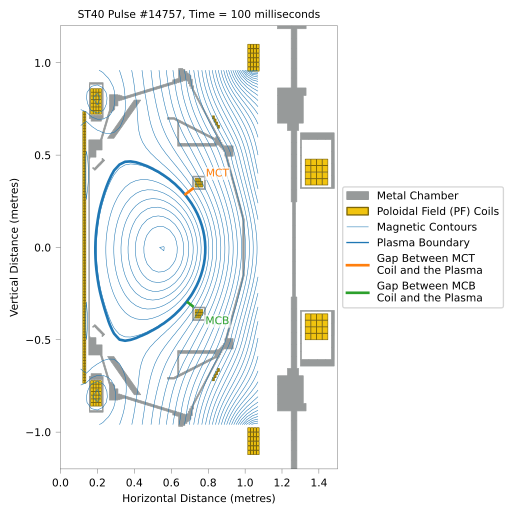
Figure 1: Snapshot of the magnetic field during an ST40 pulse from the November 2025 campaign. RT-GSFit was used in real time to control the gap between the MCT/MCB (merging compression top/bottom) coils and the last closed flux surface (plasma boundary).
The core routines in the src/ directory are written in C because RT-GSFit needs to integrate seamlessly with the Tokamak plasma control system. The ST40 control system uses MathWorks Simulink, which auto-generates C code, and this approach is common across many Tokamak control architectures. By writing the core components in C, RT-GSFit can integrate reliably with the existing control stack.
Python is used for utility functions and for some of the integration tests. For example, tests/rtgsfit_verify_analytic checks the RT-GSFit output against an analytic solution, and tests/rtgsfit_vs_gsfit verifies agreement between RT-GSFit and GSFit for three different ST40 pulses. These tests are described in more detail in the Tests section of this README.
GSFit is similar to RT-GSFit, except that it a post-shot code. GSFit is more suited to post-shot analysis, where it can perform additional post-processing and benefit from higher accuracy. However, as demonstrated in tests/rtgsfit_vs_gsfit, RT-GSFit produces results that closely agree with GSFit.
Both RT-GSFit and GSFit solve the plasma equilibrium for an ideal, single-fluid MHD model assuming toroidal symmetry. We plan to release a manual with full algorithmic details. Our approach is closely aligned with that presented in the following excellent paper:
J.-M. Moret, et. al., "Tokamak equilibrium reconstruction code LIUQE and its real time implementation", Fusion Eng. Design, 91, 2015
RT-GSFit also uses routines from GSFit to compute key values that can be calculated before each shot, such as the mutual inductance matrices between the interior coordinates and diagnostic coordinates (e.g., flux loops) for ST40. These are used to generate the constants.c file needed in the src/ directory. Delegating pre-shot calculations to GSFit ensures a single authoritative codebase and helps avoid accidental discrepancies.
In this section we will give a brief overview of how we setup the code for integration with the ST40 plasma control system.
To meet the real-time performance requirements of RT-GSFit, we precompute as many values as possible before the system enters live operation. As part of this design, you’ll notice that while constants.h exists in the src/ directory, the corresponding constants.c file is intentionally not included.
The constants.c file must be generated prior to compiling and running RT-GSFit. An example workflow demonstrating how to generate this file (using a simplified large-aspect-ratio Tokamak model) is provided in the tests/rtgsfit_verify_analytic directory. This workflow is described in more detail in Section 5.2 RT-GSFit vs. Analytic Solution Test. However, when running RT-GSFit within the Plasma Control System (PCS), the workflow includes additional steps beyond those used in the analytic verification test which we will describe here.
First, the required input data is written to Tokamak Energy’s MDSPlus server using a script similar to the one demonstrated in GSFit Example 5. During the November 2025 campaign, data was stored in the RTGSFIT tree under pulse number 99,000,230 (with 230 designating Program 2.3), and all relevant values were placed in the PRESHOT node. Access to Tokamak Energy’s MDSPlus server is restricted to TE employees and approved collaborators.
If the constants.c file has already been generated and placed in the src/ directory, the code can be compiled using a command such as:
cd src/
make SHOT=0 RUN_NAME=no_mds DEBUG=1
Here, the SHOT and RUN_NAME parameters may be set to any integer or string, respectively—these values are not required for compilation at this stage and will be explained later. The DEBUG=1 option enables additional compiler flags that improve diagnostics and debugging support, at the cost of slower runtime performance. This configuration is used in the example provided in the RT-GSFit vs. Analytic Solution Test.
In the ST40 PCS workflow, the constants.c file is not manually generated. Instead, it is produced automatically during compilation via the Makefile, which calls the script utility/mdsplus_const_to_file.py. This script retrieves the input data stored during the initialisation step and generates the constants.c prior to compilation.
To run this script, a Python environment with MDSplus installed is required. On newmsmaug2 (Tokamak Energy’s internal server), the environment is currently set up as follows:
uv venv --python 3.13
source .venv/bin/activate
uv pip install /home/alex.prokopyszyn/my_mdsplus/python/MDSplus/.
uv pip install "numpy<2"
where uv is a python package manager.
Once the environment is configured and activated, the compilation step for PCS operation is:
cd src/
make clean
make SHOT=99000230 RUN_NAME=RUN12 DEBUG=0
Note: Running make clean will also remove any constants.c file in src/, in addition to the standard build artefacts.
The compilation process generates shared library (.so) files and places them in the lib/ directory. Since RT-GSFit is built as a shared library rather than a standalone executable, it must be called from an external runtime environment.
In the RT-GSFit vs. Analytic Solution Test workflow, RT-GSFit is executed from Python using the script located at:
tests/rtgsfit_verify_analytic/src/rtgsfit_verify_analytic/replay_rtgsfit.py
This script loads the compiled library, passes measurement and coil data to the solver, and iterates the solution, simulating a real-time control loop. This behaviour is similar to how RT-GSFit is used inside the ST40 Plasma Control System (PCS).
However, the full PCS implementation cannot be shown here, as the Simulink model and deployment pipeline are closed-source. Nevertheless, the analytic replay example provides a representative demonstration of the runtime interaction model used in actual experiments.
All tests are located in the tests/ directory.
The subdirectories tests/rtgsfit_verify_analytic and tests/rtgsfit_vs_gsfit each contain a self-contained mini-repository, including their own README.md and Python virtual environments. These directories provide the main examples for running and validating RT-GSFit.
Additional legacy unit tests are also included in the tests/ directory. These were developed during earlier stages of the project but are not currently maintained or used, as full documentation for them is not available.
Further testing and documentation are planned, including:
- a test case using zero inputs,
- additional unit tests, and
- cross-verification against codes written outside Tokamak Energy such as FreeGSNKE.
We have some unit tests for the find_plasma.c file which we can be run using.
cd src/
cp ../test_data/constants.c .
make SHOT=0 RUN_NAME=no_mds DEBUG=1 test_find_plasma
./test_find_plasmaThis test runs automatically as part of the CI/CD workflow for the repository (see .github/workflows/main.yml). Its purpose is to verify that RT-GSFit converges to a known analytic equilibrium representing a large–aspect-ratio Tokamak with zero plasma beta.
Details of the analytic formulation are provided in:
tests/rtgsfit_verify_analytic/latex/Analytic_Solution/Analytic_Solution.pdf
For this test, we set up a simplified tokamak configuration including flux loops and magnetic pickup (BP) probes. The computational grid and diagnostic locations are shown in Figure 2.
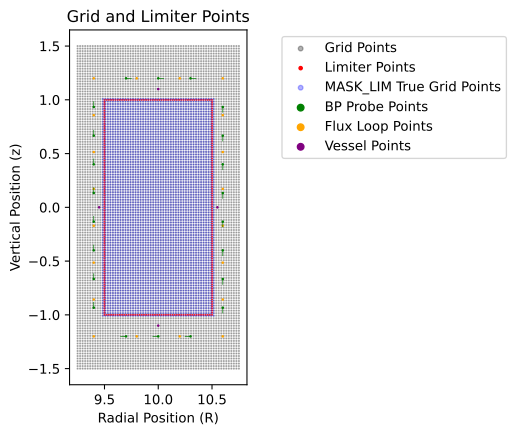
Figure 2: Computational grid with limiter coordinates and diagnostic locations (BP probes and flux loops).
The numerical result produced by RT-GSFit is compared against the analytic reference solution. Despite being intentionally initialised with a poor starting flux guess, the solver successfully converges toward the correct equilibrium. As shown in Figure 3, both the poloidal flux surfaces and diagnostic predictions approach the analytic solution over successive iterations.
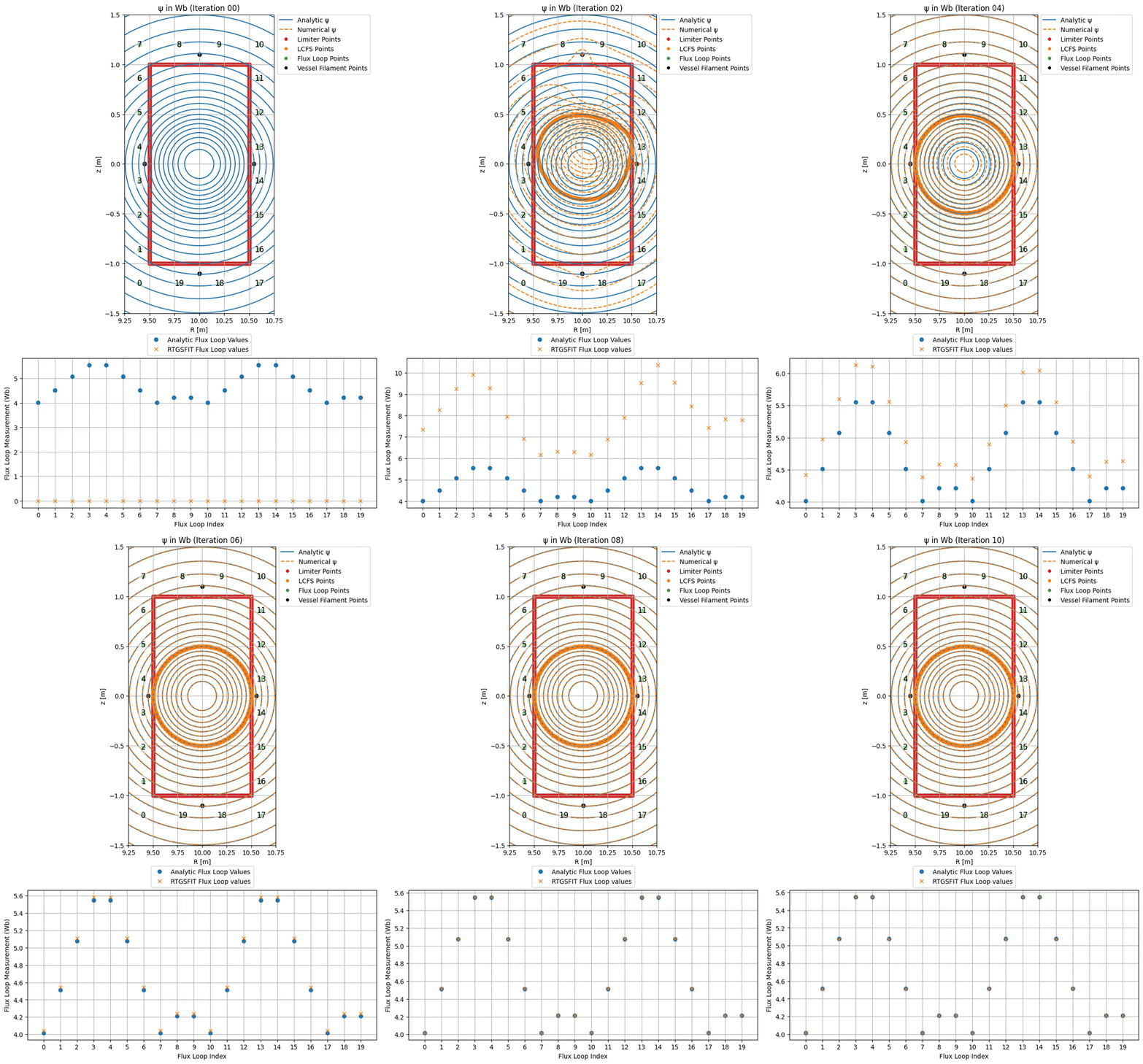
Figure 3: Convergence of the RT-GSFit poloidal flux and associated flux loop measurements toward the analytic reference solution.
In contrast to the previous test, this comparison is not executed automatically in the CI/CD pipeline, as it requires access to Tokamak Energy’s internal MDSPlus server. Instead, it is run periodically offline as part of routine validation.
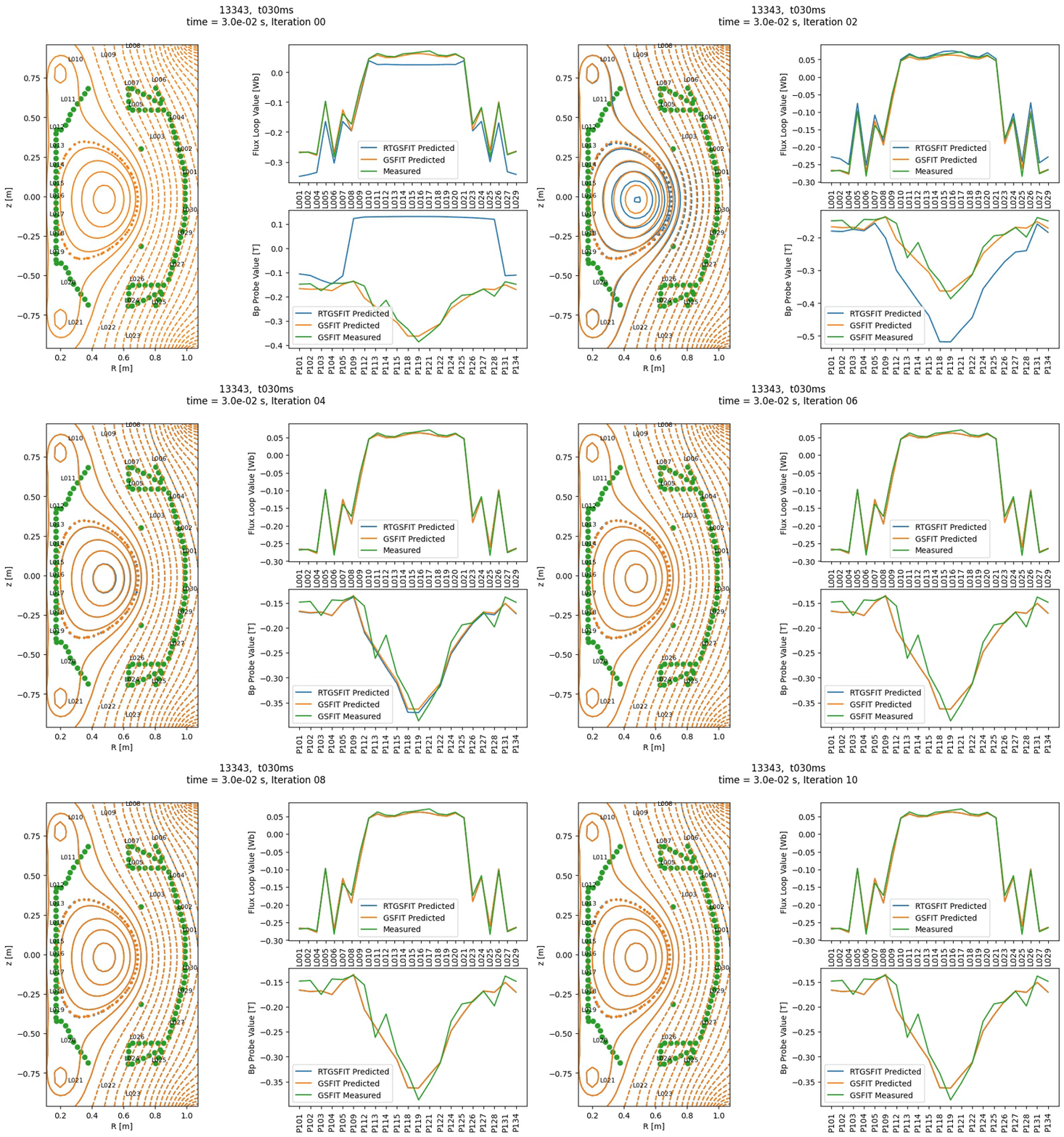
Figure 4: Convergence of the RT-GSFit poloidal flux and associated diagnostic signals (flux loops and BP probes) toward the GSFit reference solution. The green markers in the left panel indicate the candidate limiter points used by RT-GSFit.
We use the the COCOS 13 coordinate system, as described in O. Sauter and S. Y. Medvedev, "Tokamak Coordinate Conventions: COCOS", Comput. Phys. Commun. 184, 2013. In summary, flux is measured in weber, and the poloidal angle increases counterclockwise, starting from the outboard mid-plane.
- Allman bracket style
- Global constants are fully capitilised with underscores e.g. R_GRID
- All global variables are constant and defined at compile time
- variables and function names should be written in snake case i.e. lower_case_with_underscores
- variable names should be a noun and should refer to the quantity rather than a Greek letter. e.g. flux instead or psi.
- function names should begin with a verb e.g. 'get_flux_norm'
- boolean variables are simply integers in C. Maybe use short or other inbuilt types
- Have not used size_t or any other non-inbuilt types
- Boolean names should begin with is_ prefix to differentiate them from other variables
- Boolean names should be always be in the "positive" affirmation, with 1 being true and 0 being false
- order of variables should go from largest to smallest e.g. GRID_R_MIN as if it was sucessive objects in the OOP paradigm.
- Green's functions are prefixed with g_
- docstring format
- order of inputs outputs
The R_GRID and Z_GRID variables each contain N_R × N_Z elements. In the code, they are explicitly stored as 1D arrays in row-major order, but it is often conceptually useful to treat them as 2D grids. In this view, each row of the 2D grid corresponds to a contiguous block in the flattened 1D array.
The tables below show how the 2D indices map to slices of the 1D storage. Here, R_VEC and Z_VEC are 1D arrays of length N_R and N_Z, respectively, representing the unique values of R_GRID and Z_GRID in ascending order.
| Row index | R_GRID slice |
Corresponding R_VEC |
|---|---|---|
0 |
R_GRID[0 : N_R-1] |
R_VEC[0 : N_R-1] |
1 |
R_GRID[N_R : 2*N_R-1] |
R_VEC[0 : N_R-1] |
| ... | ... | ... |
i |
R_GRID[i*N_R : (i+1)*N_R-1] |
R_VEC[0 : N_R-1] |
| ... | ... | ... |
N_Z–1 |
R_GRID[N_R*(N_Z-1) : N_R*N_Z-1] |
R_VEC[0 : N_R-1] |
| Row index | Z_GRID slice |
Corresponding Z_VEC |
|---|---|---|
0 |
Z_GRID[0 : N_R-1] |
Z_VEC[0] |
1 |
Z_GRID[N_R : 2*N_R-1] |
Z_VEC[1] |
| ... | ... | ... |
i |
Z_GRID[i*N_R : (i+1)*N_R-1] |
Z_VEC[i] |
| ... | ... | ... |
N_Z–1 |
Z_GRID[N_R*(N_Z-1) : N_R*N_Z-1] |
Z_VEC[N_Z-1] |
Variables such as INV_R_LTRB_MU0 with the suffix _LTRB are defined along the Left, Top, Right, and Bottom boundaries of the grid.
They are ordered sequentially along the boundary as follows:
(R_MIN, Z_MIN) → (R_MIN, Z_MAX) → (R_MAX, Z_MAX) → (R_MAX, Z_MIN) → (R_MIN, Z_MIN)
Going forward, new tasks will be added and tracked through GitHub Issues rather than documented here. There are still a few older notes from earlier development that haven't yet been migrated, so they're listed below for now.
- dgelss vs dgelsd
- Python flux testing
- Interpolation for
hess_rrandhess_det - Boundary index convention
- Timing / performance checks
- Improve comments and general code documentation