Zipped VDF and optimization
Union supports compression in .vdf volumes based on zip algorithm. Special zipped-stream allows to read data very quickly.
If you have a big volume, you can try to compress it (for example zGamePad.vdf 30MB compressed to 2.5MB due of textures). This allows you to reduce the occupied disk space on the player's disk. Steam Workshop will copy your files faster and also wear out the player's disk less.
You can compress or decompress volume with this VDFS tool. To adjust the compression ratio and read speed, open File → Zip options.
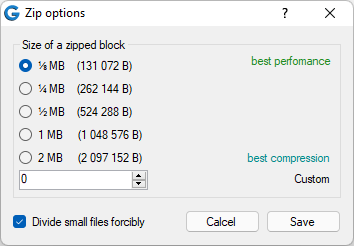
Compression rule:
- Less zipped block = Less compression ratio, Higher speed.
- Higher zipped block = Higher compression ratio, Less speed.
For a normal situation, the block ⅛ MB is optimal.
If you use many files with the same contents, you can use the VDFS optimization tool. After that, all volume files will refer to the once data source.